Friday, October 29, 2010

WCF 4.0 CommunicatinException

Found an exception sometimes in WCF 4.0 communication with wsHttpBinding binding in a test environment:

CommunictionException: "An error occurred while receiving the HTTP response to ....svc. This could be due to the service endpoint binding not using the HTTP protocol. This could also be due to an HTTP request context being aborted by the server (possibly due to the service shutting down). See server logs for more details."

InnerExcpetion: "The underlying connection was closed: An unexpected error occurred on a receive."

InnerInnerException: "An existing connection was forcibly closed by the remote host"

NativeErrorCode: 10054

Turn on WCF logging in the server and found following error message using Microsoft Service Trace Viewer:

"There was an error while trying to serialize parameter http://tempuri.org/:Get...Result. The InnerException message was 'Maximum number of items that can be serialized or deserialized in an object graph is '65536'. Change the object graph or increase the MaxItemsInObjectGraph quota. '. Please see InnerException for more details."

Update server's web.config as suggested:
<system.serviceModel>
<behaviors>
<serviceBehaviors>
<behavior>
<!-- ... -->
<dataContractSerializer maxItemsInObjectGraph="2147483647" />
</behavior>
</serviceBehaviors>
</behaviors>
<!-- ... -->
</system.serviceModel>
Now get another exception in the client:
NetDispatcherFaultException: The formatter threw an exception while trying to deserialize the message: There was an error while trying to deserialize parameter http://tempuri.org/:Get...Result. The InnerException message was 'Maximum number of items that can be serialized or deserialized in an object graph is '65536'. Change the object graph or increase the MaxItemsInObjectGraph quota. '. Please see InnerException for more details.
Inner Exception: "Maximum number of items that can be serialized or deserialized in an object graph is '65536'. Change the object graph or increase the MaxItemsInObjectGraph quota. "

Update client's app.config:
<system.serviceModel>
<client>
<endpoint behaviorConfiguration="ServiceBehavior" _A_B_C_Setting... />
</client>
<behaviors>
<endpointBehaviors>
<behavior name="ServiceBehavior">
<dataContractSerializer maxItemsInObjectGraph="2147483647"/>
</behavior>
</endpointBehaviors>
</behaviors>
</system.serviceModel>
The exception is gone after configuration update.

Wednesday, September 29, 2010

.NET 4.0 Parallel IO Test

The new .NET 4.0 TPL simplifies the parallelizing programming. Would it speed up the I/O in reading and writing a large volumn of files? The answer is yes. Through a quick test in my desktop (Intel i5 760 CPU, 8G memory,Windows Server 2008 64-bit), I found that the parallel writing 10000 small files is about 4 times faster than that without TPL. Parallel loading all those 10000 files is about 6 times faster than that without using TPL. The test code is below:
using System;
using System.Collections.Generic;
using System.Text;
using System.Xml.Linq;
using System.IO;
using System.Diagnostics;
using System.Threading.Tasks;

class Program
{
static string path = @"c:\Test\";
static string fakeValue = GetFakeValue(1024);
static int fileNumber = 10000;
static void Main(string[] args)
{
CleanupFolder();
Stopwatch watch = new Stopwatch();

watch.Start();
SaveOneByOne();
watch.Stop();
Console.WriteLine("Saving {0} files serially takes {1} milli-seconds.",
fileNumber, watch.ElapsedMilliseconds);

watch.Restart();
ReadOneByOne();
watch.Stop();
Console.WriteLine("Reading {0} files serially takes {1} milli-seconds.",
fileNumber, watch.ElapsedMilliseconds);

CleanupFolder();
watch.Restart();
SaveInParallel();
watch.Stop();
Console.WriteLine("Saving {0} files in parallel takes {1} milli-seconds.",
fileNumber, watch.ElapsedMilliseconds);

watch.Restart();
ReadInParallel();
watch.Stop();
Console.WriteLine("Reading {0} files in parallel takes {1} milli-seconds.",
fileNumber, watch.ElapsedMilliseconds);

Console.Read();
}

static void SaveOneByOne()
{
for (int i = 0; i < fileNumber; i++)
{
XDocument xfile = GetXDocument(i.ToString(), fakeValue);
xfile.Save(path + i.ToString() + ".xml");
}
}

static void ReadOneByOne()
{
List<XDocument> files = new List<XDocument>();
for (int i = 0; i < fileNumber; i++)
{
XDocument xfile = XDocument.Load(path + i.ToString() + ".xml");
files.Add(xfile);
}
}

static void SaveInParallel()
{
Parallel.For(0, fileNumber, delegate(int i)
{
XDocument xfile = GetXDocument(i.ToString(), fakeValue);
xfile.Save(path + i.ToString() + ".xml");
});
}

static void ReadInParallel()
{
List<XDocument> files = new List<XDocument>();
Parallel.For(0, fileNumber, delegate(int i)
{
XDocument xfile = XDocument.Load(path + i.ToString() + ".xml");
files.Add(xfile);
});
}

static void CleanupFolder()
{
if (!Directory.Exists(path))
{
Directory.CreateDirectory(path);
}
else
{
//Array.ForEach(Directory.GetFiles(path), (string file) => File.Delete(file));
Directory.Delete(path, true);
Directory.CreateDirectory(path);
}
}

static XDocument GetXDocument(string key, string value)
{
return new XDocument(new XDeclaration("1.0", "utf-8", "yes"),
new XElement("Items",
new XElement("Item",
new XElement("Key", key),
new XElement("Value", value))));
}

static string GetFakeValue(int length)
{
StringBuilder sb = new StringBuilder();
string values = "abcdefghijklmnopqrstuvwxyz0123456789";
Random rand = new Random();
for (int i = 0; i < length; i++)
{
sb.Append(values[rand.Next(0, 35)]);
}
return sb.ToString();
}
}
Result:
Saving 10000 files serially takes 29528 milli-seconds.
Reading 10000 files serially takes 2389 milli-seconds.
Saving 10000 files in parallel takes 8072 milli-seconds.
Reading 10000 files in parallel takes 386 milli-seconds.
The results vary slightly in different tests and they are consistent overall.

Monday, August 30, 2010

SharePoint 2010 And SharePoint 2007 Content Database

SharePoint 2007 content database can be used by SharePoint 2010 directly without major problems. You can created a site collection in SharePoint 2007, copy its content database to the SharePoint 2010 environment, configure your SharePoint 2010 site collection content database to it, and you are done! Andrew Connell gave detailed instructions on how to do this with WCM sites.

That implies there're no big difference between SharePoint 2010 and SharePoint 2007 in terms of back-end database schema.

I checked briefly and found following tables existing in SharePoint 2007 but not in SharePoint 2010:
  1. Categories
  2. Image0x
  3. WebCat
  4. WebParts
More than 10 tables are added to SharePoint 2010 content database:
  1. AllfileFragments
  2. AllListsAux
  3. AllListsPlus
  4. AllListsUniqueFields
  5. AllLookupRelateionships
  6. AllWebParts
  7. CustomActions
  8. FeatureTracking
  9. Resources
  10. SharedAccessRequests
  11. SolutionResourceUsageDaily
  12. SolutionResourceUsageDailyOrdinal
  13. SolutionResourceUsageLog
  14. SolutionResourceUsageWindowed
  15. Solutions
  16. WebsPlus

Tuesday, August 03, 2010

RadEditor for MOSS 2007 - Assembly Binding

Just a quick note that it's possible to upgrade Telerik RadEditor for MOSS to a new version without changing registry on Page Layout and reference on VS project. The magic is the assembly binding. For example, if you want to upgrade the RadeEditor from version 5.6.2.0 to 5.8.0.0, first you need to install and deploy the new RadEditor solution package, then add following to the web.config file:
<configuration>
...
<runtime>
...
<dependentAssembly>
<assemblyIdentity name="RadEditorSharePoint" publicKeyToken="1f131a624888eeed" />
<bindingRedirect oldVersion="5.6.2.0" newVersion="5.8.0.0" />
</dependentAssembly>
<dependentAssembly>
<assemblyIdentity name="Telerik.Web.UI" publicKeyToken="121fae78165ba3d4" />
<bindingRedirect oldVersion="2009.3.1314.20" newVersion="2010.2.713.20" />
</dependentAssembly>
</assemblyBinding>
</runtime>
...
</configuration>

RadEditor for MOSS 2007 - Spell-check Multi-language Support

We use Telerik RadEditor for MOSS (5.6.2.0) as a cross-browser rich-text editor in one MOSS WCM publishing site to replace out-of-box Rich HTML field control. One great feature of the RadEditor is its AJAX spell checking function. By default, it would search against all three default dictionaries, English (en-US), French(fr-FR) and German(de-DE) that are included in solution package.

Is it possible to spell check based on the context that is selected by the end user? The answer is yes. Following are the setup steps:

1. Install and deploy RadEditorMoss solution package.

2. Open up related Page Layout and replace the Rich HTML Field Controls (or text fields) by the RadEditor Control:
  • Register Telerik assembly in Page Layout

    <%@ Register TagPrefix="telerik" Namespace="Telerik.SharePoint.FieldEditor" Assembly="RadEditorSharePoint, Version=5.6.2.0, culture=neutral, PublicKeyToken=1f131a624888eeed" %>

  • Replace the tag of the default editor with the RadeEditor control:

    <telerik:RadHtmlField id="PageContent" FieldName="PageContent" runat="server">telerik:RadHtmlField>

3. (Optional) Download dictionaries from web site http://www.telerik.com/community/forums/aspnet-ajax/spell/147971-radspell-dictionaries.aspx, and save dictionaries with tdf extension to RadEditor dictionary folder (C:\Program Files\Common Files\Microsoft Shared\Web Server Extensions\wpresources\RadEditorSharePoint\5.6.2.0__1f131a624888eeed\Resources\App_Data\RadSpell).

4. Inside RadEditor global resource folder (C:\Program Files\Common Files\Microsoft Shared\Web Server Extensions\wpresources\RadEditorSharePoint\5.6.2.0__1f131a624888eeed\Resources), update ToolsFile.XML and add Languages element just before </root> tag (assume that both en-Us.tdf and fr-FR.tdf are installed):
<root>

...
<tools name="MossTools1">
<tool name="AjaxSpellCheck" />
</tools>
...
<languages>
<language code="en-US" title="English"></language>
<language code="fr-FR" title="French"></language>
</languages>
</root>

5. Now you have option to select English or French for spell-check on the toolbar on each RadEditor instance, for example, you want to check English on PageContent text, and check French on PageContentFrench text:

RadEditor for MOSS 2007 - Re-package

Telerik’s RadEditor for SharePoint includes two versions, a free Lite version that is similar to the default rich-text editor with addition of providing cross-browser support, and a full version with more features such as AJAX spell-checking. Here RadEditor for MOSS 5.6.2.0 full version is used for our discussion.

After installation, many RadEditor settings, such as toolbar size, can be configured in ConfigFile.xml, ToolsFile.xml, ListConfigFile.xml, and ListConfigFile.xml under RadEditor's global resource folder; (C:\Program Files\Common Files\Microsoft Shared\Web Server Extensions\wpresources\RadEditorSharePoint\5.6.2.0__1f131a624888eeed\Resources). The details of settings can be found in http://www.telerik.com/help/aspnet-ajax/moss-introduction.html.

Manually changing the configuration files is cumbersome. Consider an environment of a QA farm, a staging farm, an authoring farm and a production farm, you have to update each machine one by one. The better way is to change the configuration and then re-package to a new wsp for deployment.

Steps to re-package RadEditorMOSS.wsp:

1. Rename the original RadEditorMOSS.wsp to RadEditorMOSS.cab.

2. Extract all files from RadEditorMOSS.cab to a RadEditorMOSS folder using any unzip tool such as 7-zip; remain the original folder structure in extraction. Notice all configuration files we mentioned above are located in RadEditorMOSS/Resources folder:


3.Update configuration files as required.

4.Create a repack.ddf file in the RadEditorMOSS extraction folder. The ddf diamond file has following instruction:
.OPTION Explicit
.Set DiskDirectoryTemplate=CDROM
.Set MaxDiskSize=CDROM
.Set CompressionType=MSZIP
.Set UniqueFiles=On
.Set Cabinet=On
;.Set DiskDirectory1=Package
.Set CabinetNameTemplate="RadMOSSEditorRepack.wsp"

;******************************

manifest.xml
RadEditorSharePoint.dll
RadEditorSharePoint.dwp
Telerik.Web.UI.dll

.Set DestinationDir=CONTROLTEMPLATES
CONTROLTEMPLATES\TelerikRadEditorHtml.ascx
CONTROLTEMPLATES\TelerikRadEditorText.ascx

.Set DestinationDir=Images
Images\RadEditor.gif

.Set DestinationDir=RadEditorFeatureRichHtml
RadEditorFeatureRichHtml\Feature.xml

.Set DestinationDir=RadEditorFeatureRichText
RadEditorFeatureRichText\Feature.xml

.Set DestinationDir=Resources
Resources\ConfigFile.xml
Resources\EditorToolPart.js
Resources\ListConfigFile.xml
Resources\ListToolsFile.xml
Resources\MOSSEditorTools.js
Resources\Telerik.Web.UI.DialogHandler.aspx
Resources\Telerik.Web.UI.SpellCheckHandler.ashx
Resources\ToolsFile.xml
Resources\web.config

.Set DestinationDir=Resources\App_Data\RadSpell
Resources\App_Data\RadSpell\de-DE.tdf
Resources\App_Data\RadSpell\en-US.tdf
Resources\App_Data\RadSpell\fr-FR.tdf

.Set DestinationDir=Resources\App_GlobalResources
Resources\App_GlobalResources\RadEditor.Dialogs.de-DE.resx
Resources\App_GlobalResources\RadEditor.Dialogs.fr-FR.resx
Resources\App_GlobalResources\RadEditor.Dialogs.resx
Resources\App_GlobalResources\RadEditor.Main.de-DE.resx
Resources\App_GlobalResources\RadEditor.Main.fr-FR.resx
Resources\App_GlobalResources\RadEditor.Main.resx
Resources\App_GlobalResources\RadEditor.Modules.de-DE.resx
Resources\App_GlobalResources\RadEditor.Modules.fr-FR.resx
Resources\App_GlobalResources\RadEditor.Modules.resx
Resources\App_GlobalResources\RadEditor.Tools.de-DE.resx
Resources\App_GlobalResources\RadEditor.Tools.fr-FR.resx
Resources\App_GlobalResources\RadEditor.Tools.resx
Resources\App_GlobalResources\RadListBox.resx
Resources\App_GlobalResources\RadProgressArea.resx
Resources\App_GlobalResources\RadScheduler.Main.resx
Resources\App_GlobalResources\RadSpell.Dialog.de-DE.resx
Resources\App_GlobalResources\RadSpell.Dialog.fr-FR.resx
Resources\App_GlobalResources\RadSpell.Dialog.resx
Resources\App_GlobalResources\RadUpload.resx

.Set DestinationDir=Resources\ToolImages
Resources\ToolImages\MOSSDeleteTableElement.gif
Resources\ToolImages\MOSSHelp.gif
Resources\ToolImages\MOSSImageManager.gif
Resources\ToolImages\MOSSInsertTable.GIF
Resources\ToolImages\MOSSInsertTableElement.gif
Resources\ToolImages\MOSSLeftToRight.GIF
Resources\ToolImages\MOSSLinkManager.gif
Resources\ToolImages\MOSSRightToLeft.GIF
Resources\ToolImages\MOSSTemplateManager.gif
Resources\ToolImages\RadEditorStyles_Black.css
Resources\ToolImages\RadEditorStyles_Default.css
Resources\ToolImages\RadEditorStyles_Forest.css
Resources\ToolImages\RadEditorStyles_Hay.css
Resources\ToolImages\RadEditorStyles_Office2007.css
Resources\ToolImages\RadEditorStyles_Outlook.css
Resources\ToolImages\RadEditorStyles_Sunset.css
Resources\ToolImages\RadEditorStyles_Telerik.css
Resources\ToolImages\RadEditorStyles_Vista.css
Resources\ToolImages\RadEditorStyles_Web20.css
Resources\ToolImages\RadEditorStyles_WebBlue.css
Resources\ToolImages\ToggleSource.GIF
4.In command line mode go to RadEditorMOSS extraction folder, type:
makecab /f repack.ddf
5.A new solution package with name of "RadMOSSEditorRepack.wsp" will be created. All installation with this RadMOSSEditorRepack.wsp will have the same custom configuration.

Monday, July 26, 2010

MongoDB E1100 Duplicate Key On Update Error

It's caused by duplicate "_id" from MongoDB documentation http://www.mongodb.org/display/DOCS/Error+Codes.

I found this error when accidentally set duplicate value to a unique indexed field.

Monday, July 19, 2010

SharePoint Cache Callback

Using ASP.NET Cache Callback, we can update the data automatically in background. This cache update callback mechanism can also be applied to SharePoint environment.

For example, SPList.Items.GetDataTable() is expensive and we may need to cache the returned datatable in memory; when the cache is expired, in the cache callback function we check if the cache data is updated or not, and refresh the cache data if corresponding data is changed in the content database.

However there's a pitfall of this approach: the cache is first inserted with user identity, but the callback functions are run with application pool identity. They may have different permissions and have different data set.

Take anonymous access as an example. Caching is usually enabled for high-volume public sites with anonymous access. Anonymous users have very limited permissions comparing to the app-pool account (system account). To resolve the problem in such case, we need to impersonate anonymous user in update callback. In SharePoint this is done by opening a site with anonymous SPUserToken. In order to get a SPUserToken with anonymous privilege, we can assign a domain service account with anonymous permissions, and get this pre-defined SPUser at run time. Code example:
    // Cache update callback function
private static void SPList_UpdateCallBack(
string key,
CacheItemUpdateReason reason,
out object value,
out CacheDependency dependency,
out DateTime expirationDateTime,
out TimeSpan slidingExpiration)
{
string siteUrl = null;
string listName = null;
DataTable newDT = null;
DataTable oldDT = HttpRuntime.Cache[key] as DataTable;
value = oldDT;

if (reason == CacheItemUpdateReason.Expired)
{
// Check if data has not been changed in database
// Only update the cache when there's change

SPSite anonymousSite = null;
try
{
string errMessage = string.Empty;
SPUserToken userToken = SPSecurityHelper.GetAnonymousUserToken(siteUrl, out errMessage);
if (!string.IsNullOrEmpty(errMessage) || userToken == null)
{
// Log error
}

// Create a SPSite with anonymous user token
anonymousSite = new SPSite(siteUrl, userToken);
if (anonymousSite != null)
{
using (SPWeb anonymousweb = anonymousSite.RootWeb)
{
SPList anonylist = anonymousweb.Lists[listName];
newDT = anonylist.Items.GetDataTable();
}
anonymousSite.Dispose();
}
value = newDT;
}
catch (Exception ex)
{
//Log error
if (oldDT != null)
value = oldDT.Copy();
else
value = null;
}
}

dependency = null;
expirationDateTime = DateTime.Now.AddSeconds(300);
slidingExpiration = Cache.NoSlidingExpiration;
}

// Helper class to get anonymous token
public class SPSecurityHelper
{
private static object lockObj = new object();
private static SPUserToken AnonymousToken = null;
public static SPUserToken GetAnonymousUserToken(string siteURL, out string errorMessage)
{
string msg = string.Empty;
if (AnonymousToken == null)
{
lock (lockObj)
{
if (AnonymousToken == null)
{
try
{
SPSecurity.RunWithElevatedPrivileges(delegate()
{
using (SPSite site = new SPSite(siteURL))
{
using (SPWeb web = site.RootWeb)
{
string userLoginName = System.Configuration.ConfigurationSettings.AppSettings["AnonymousUser.LoginName"];
if (string.IsNullOrEmpty(userLoginName))
{
msg = "Failed in getting anonymous user token: missing AnonymousUser.LoginName in Web.Config.";
}
else
{
SPUserCollection users = web.Users.GetCollection(new string[] { userLoginName });
if (users != null && users.Count == 1 && users[0].UserToken != null)
{
AnonymousToken = users[0].UserToken;
}
else
{
msg = string.Format("Failed to get user token of {0} from SharePoint.", userLoginName);
}
}
}
}
});
}
catch (Exception ex)
{
msg = ex.Message;
throw;
}
}
}
}

errorMessage = msg;
return AnonymousToken;
}
}

Monday, July 05, 2010

SharePoint SPQuery And DataSet Returned From Content Database

Our network guys observed a big traffic between our SharePoint server and its content database. We then did some tests and found a SPQuery for 1000 list items resulting in more than 3000+ rows returned from content database, and each row has more than 120 columns.

Why database returns more rows than the list item number? Is it returning all versions? It would be nightmare if that's case because the versions will keep growing in product environment. Good news is that SPQuery is only getting latest version, not all versions from database. The extra rows actually are related to Multi-lookup values.

To explore this let's first create a simple Province custom list:
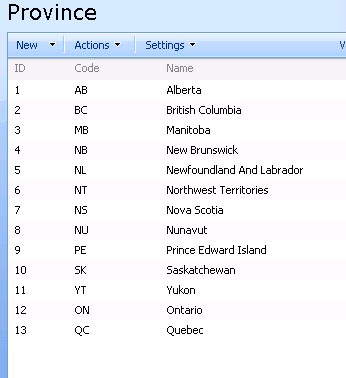
Next we create a multi-lookup site column named "AvailableProvinces" referencing the Province list:
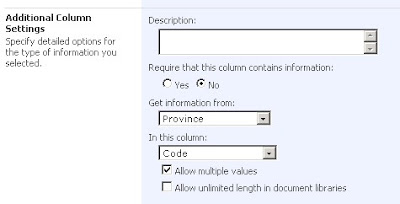
Then we create another custom list to use this "AvailableProvinces" column, and add three list itmes:
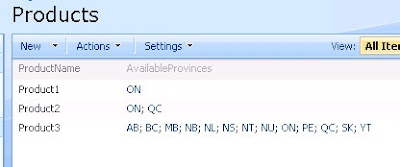
Now we can build a simple console application to test the SPQuery:
using System;
using System.Text;
using Microsoft.SharePoint;

class Test
{
static void Main()
{
QueryData("http://localhost", "Products", "Product1");
QueryData("http://localhost", "Products", "Product2");
QueryData("http://localhost", "Products", "Product3");

Console.Read();
}

static void QueryData(string siteName, string listName, string productName)
{
using (SPSite site = new SPSite(siteName))
{
using (SPWeb web = site.OpenWeb())
{
SPList list = web.Lists[listName];
SPQuery query = new SPQuery();
query.ViewFields = "<FieldRef Name='ProductName' />";
query.ViewFields += "<FieldRef Name='AvailableProvinces' />";

StringBuilder queryText = new StringBuilder();
queryText.Append("<Where><Eq><FieldRef Name=\"ProductName\"/><Value Type=\"Text\">");
queryText.Append(productName);
queryText.Append("</Value></Eq></Where>");
query.Query = queryText.ToString();

SPListItemCollection items = list.GetItems(query);
Console.WriteLine("Item count: {0}", items.Count);
}
}
}
}
Start the SQL Server profile and you will notice complicate SQL queries sent to content database. The SQL for the first SPQuery (product1) is:

exec sp_executesql N' SELECT t5.*, t7.[MetaInfo] FROM (SELECT DISTINCT t3.*, t4.[tp_Ordinal] , t2.[tp_ID] AS c4, t8.[nvarchar3] AS c4c5 FROM ( SELECT TOP 2147483648 t1.[Type] AS c0,t1.[Id] AS
c2,UserData.[tp_DeleteTransactionId],UserData.[nvarchar3],UserData.[tp_ID],UserData.[tp_CopySource],UserData.[tp_Version],UserData.[tp_IsCurrentVersion],UserData.[tp_Created],CASE
WHEN DATALENGTH(t1.DirName) = 0 THEN t1.LeafName WHEN DATALENGTH(t1.LeafName) = 0 THEN t1.DirName ELSE t1.DirName + N''/'' + t1.LeafName END AS
c1,UserData.[tp_HasCopyDestinations],UserData.[tp_ModerationStatus],UserData.[tp_Level],UserData.[tp_SiteId],UserData.[tp_LeafName],UserData.[tp_CalculatedVersion],UserData.[tp_DirName],t1.[ScopeId]
AS c3,UserData.[int1] FROM UserData LEFT OUTER LOOP JOIN Docs AS t1 WITH(NOLOCK) ON ( 1 = 1 AND UserData.[tp_RowOrdinal] = 0 AND t1.SiteId =
UserData.tp_SiteId AND t1.SiteId = @L2 AND t1.DirName = UserData.tp_DirName AND t1.LeafName = UserData.tp_LeafName AND t1.Level =
UserData.tp_Level AND t1.IsCurrentVersion = 1 AND (1 = 1)) WHERE UserData.tp_ListID=@L4 AND ( (UserData.tp_IsCurrent = 1) ) AND UserData.tp_SiteId=@L2 AND (UserData.tp_DirName=@DN) AND UserData.tp_RowOrdinal=0 AND ((UserData.[nvarchar3] = @L3TXP) AND t1.SiteId=@L2 AND (t1.DirName=@DN)) ORDER BY UserData.[tp_ID] Asc ) AS t3 LEFT OUTER JOIN UserDataJunctions AS t4 ON t3.[tp_SiteId] = t4.[tp_SiteId] AND t3.[tp_DeleteTransactionId] = t4.[tp_DeleteTransactionId] AND t3.[tp_IsCurrentVersion] = t4.[tp_IsCurrentVersion] AND t3.[tp_DirName] = t4.[tp_DirName] AND t3.[tp_LeafName] = t4.[tp_LeafName] AND t3.[tp_CalculatedVersion] = t4.[tp_CalculatedVersion] AND t3.[tp_Level] = t4.[tp_Level] LEFT OUTER JOIN UserDataJunctions AS t2 ON t3.[tp_SiteId] = t2.[tp_SiteId] AND t3.[tp_DeleteTransactionId] = t2.[tp_DeleteTransactionId] AND t3.[tp_IsCurrentVersion] = t2.[tp_IsCurrentVersion] AND t3.[tp_DirName] = t2.[tp_DirName] AND t3.[tp_LeafName] = t2.[tp_LeafName] AND t3.[tp_CalculatedVersion] = t2.[tp_CalculatedVersion] AND t3.[tp_Level] = t2.[tp_Level] AND t4.[tp_Ordinal] = t2.[tp_Ordinal] AND t2.[tp_FieldId] = ''{91b18af0-5ef3-477b-aec1-94ab1f7ddd80}'' LEFT OUTER JOIN AllUserData AS t8 WITH(NOLOCK, INDEX=AllUserData_PK) ON (t8.[tp_ListId] = @L5 AND t8.[tp_Id] = t2.[tp_ID] AND t8.[tp_RowOrdinal] = 0 AND t8.[tp_CalculatedVersion] = 0 AND t8.[tp_DeleteTransactionId] = 0x ) ) AS t5 LEFT OUTER JOIN Docs AS t7 WITH(NOLOCK) ON t7.[SiteId] = t5.[tp_SiteId] AND t7.[DeleteTransactionId] = t5.[tp_DeleteTransactionId] AND t7.[DirName] = t5.[tp_DirName] AND t7.[LeafName] = t5.[tp_LeafName] AND t7.[Level] = t5.[tp_Level] ORDER BY t5.tp_ID Asc,t5.[tp_Ordinal] OPTION (FORCE ORDER) ',N'@L0 uniqueidentifier,@L2 uniqueidentifier,@L3TXP nvarchar(255),@DN nvarchar(260),@L4 uniqueidentifier,@L5 uniqueidentifier',@L0='00000000-0000-0000-0000-000000000000',@L2='CC8A9551-7819-4148-B73D-9DBA0A472335',@L3TXP=N'Product1',@DN=N'/Lists/Products',@L4='60D40990-B719-443F-9CFD-7511BCE6B0D5',@L5='EFF07396-C855-4D93-BBFE-2334B7A3CF68'

The results of three SQL queries:

We only have two view fields but 24 columns are returned. Also we can see that multiple rows returned for same list item are the multi-lookup result set. That’s the way SharePoint deals with multi-lookup value, and tp_Ordinal column identifies different mulitp-lookup value joined with another list. For example, product2's AvailableProvinces column has value of “ON, QC”, the corresponding SQL query returns two rows of data; product3 includes all provinces thus 13 rows are returned from content database.

So data size of SQL server's return won’t become bigger with more versions, but it will grow if more multi-lookup values are added.

Tuesday, June 29, 2010

SharePoint List GetDataTable Extension Methods

In SharePoint there's a SPList.Items.GetDataTable() method returning a DataTable with all list items. However the DataTable doesn't include all hidden fields. This may cause problems if you need to access some of those hidden fields. For example in one of our SharePoint solutions, we have custom caching mechanism relying on SPListItems' last Modified time stored in the hidden Modified field.

To resolve the problem I wrote some extension methods, and all SharePoint list data, no matter hidden or not, will be returned with a simple call of SPList.GetDataTableWithHiddenFields().

Code:
using System;
using System.Collections.Generic;
using System.Linq;
using System.Text;
using System.Data;
using Microsoft.SharePoint;

public static class SPListExtension
{
private const uint SPQueryItemLimit = 2000;

/// <summary>
/// Get a .NET type for SPField
/// </summary>
private static Type GetFieldType(SPField field)
{
Type type = Type.GetType("System.String");

SPFieldType fieldType = field.Type;
switch (fieldType)
{
case SPFieldType.Integer:
case SPFieldType.Counter:
type = Type.GetType("System.Int32");
break;
case SPFieldType.Text:
case SPFieldType.Note:
case SPFieldType.Choice:
case SPFieldType.Lookup:
case SPFieldType.Boolean:
type = Type.GetType("System.String");
break;
//case SPFieldType.Boolean:
// type = Type.GetType("System.Boolean");
// break;
case SPFieldType.DateTime:
type = Type.GetType("System.DateTime");
break;
case SPFieldType.Number:
case SPFieldType.Currency:
type = Type.GetType("System.Double");
break;
default:
type = Type.GetType("System.String");
break;
}
return type;
}

/// <summary>
/// Remove IDs from lookup fields
/// "1;#CODE1" => "CODE1"
/// Skip for LookupMulti fields
/// </summary>
public static string TryGetLookupCode(string value)
{
string reval = value;
if (!string.IsNullOrEmpty(value))
{
string[] valueSplit = value.Split(new string[] { ";#" },
StringSplitOptions.RemoveEmptyEntries);
int number;
if (valueSplit.Length == 2 && int.TryParse(valueSplit[0], out number) && number >= 0)
{
return valueSplit[1];
}
}
return reval;
}

/// <summary>
/// Extension method for generating DataTable based on SPList schema
/// </summary>
public static DataTable GetDataTableSchema(this SPList list)
{
string[] exludedColumns = new string[] { };
return GetDataTableSchema(list, exludedColumns);
}

/// <summary>
/// Dynamically create a DataTable based on SPList schema
/// </summary>
public static DataTable GetDataTableSchema(this SPList list, string[] excludedColumns)
{
bool hasExcludedColumns = (excludedColumns != null && excludedColumns.Length > 0);
DataTable dataTable = new DataTable(list.Title);
foreach (SPField field in list.Fields)
{
Type fieldType = GetFieldType(field);
if (!hasExcludedColumns || !excludedColumns.Contains(field.InternalName,
StringComparer.InvariantCultureIgnoreCase))
{
dataTable.Columns.Add(field.InternalName, fieldType);
}
}
return dataTable;
}

/// <summary>
/// Extension method to get DataTable from SPList with hidden fields
/// </summary>
public static DataTable GetDataTableWithHiddenFields(this SPList list)
{
string[] exludedColumns = new string[] { };
return GetDataTableWithHiddenFields(list, exludedColumns);
}

/// <summary>
/// SPList.Items.GetDataTable doesn't include hidden fields
/// This extension method returns all fields' data
/// </summary>
public static DataTable GetDataTableWithHiddenFields(this SPList list, string[] excludedColumns)
{
if (list.ItemCount == 0)
return null;

bool hasExcludedColumns = excludedColumns != null && excludedColumns.Length > 0;
DataTable dataTable = new DataTable(list.Title);
Dictionary<string, SPFieldType> fieldDict = new Dictionary<string, SPFieldType>();
List<SPListItemCollection> allListItems = new List<SPListItemCollection>();

// Generate DataTable
foreach (SPField field in list.Fields)
{
if (!hasExcludedColumns || !excludedColumns.Contains(field.InternalName,
StringComparer.InvariantCultureIgnoreCase))
{
fieldDict.Add(field.InternalName, field.Type);
Type type = GetFieldType(field);
dataTable.Columns.Add(field.InternalName, type);
}
}

// Query data
SPQuery spQuery = new SPQuery();
spQuery.RowLimit = SPQueryItemLimit;
spQuery.ViewAttributes = "Scope=\"Recursive\"";
do // Get all list items
{
SPListItemCollection itemCollection = list.GetItems(spQuery);
if (itemCollection != null && itemCollection.Count > 0)
allListItems.Add(itemCollection);
spQuery.ListItemCollectionPosition = itemCollection.ListItemCollectionPosition;
} while (spQuery.ListItemCollectionPosition != null);

// Populate DataTable with query results
Type stringType = Type.GetType("System.String");
foreach (SPListItemCollection listItems in allListItems)
{
foreach (SPListItem item in listItems)
{
DataRow dr = dataTable.NewRow();
foreach (DataColumn column in dataTable.Columns)
{
string columnName = column.ColumnName;
if (!Convert.IsDBNull(item[columnName]) && item[columnName] != null)
{
SPFieldType fieldType = fieldDict[columnName];
if (fieldType == SPFieldType.Boolean)
{
dr[columnName] = Convert.ToBoolean(item[columnName]) ? "1" : "0";
}
else if (fieldType == SPFieldType.Lookup || fieldType == SPFieldType.Invalid)
{
dr[columnName] = TryGetLookupCode(item[columnName].ToString());
}
else if (column.DataType == stringType)
{
dr[columnName] = item[columnName].ToString();
}
else
{
dr[columnName] = item[columnName];
}
}
}
dataTable.Rows.Add(dr);
}
}
return dataTable;
}
}

Note: the optional "excludedColumns" parameter defines the fields that you don't want to include in the DataTable.