It's caused by duplicate "_id" from MongoDB documentation http://www.mongodb.org/display/DOCS/Error+Codes.
I found this error when accidentally set duplicate value to a unique indexed field.
Monday, July 26, 2010
Monday, July 19, 2010
SharePoint Cache Callback
Using ASP.NET Cache Callback, we can update the data automatically in background. This cache update callback mechanism can also be applied to SharePoint environment.
For example, SPList.Items.GetDataTable() is expensive and we may need to cache the returned datatable in memory; when the cache is expired, in the cache callback function we check if the cache data is updated or not, and refresh the cache data if corresponding data is changed in the content database.
However there's a pitfall of this approach: the cache is first inserted with user identity, but the callback functions are run with application pool identity. They may have different permissions and have different data set.
Take anonymous access as an example. Caching is usually enabled for high-volume public sites with anonymous access. Anonymous users have very limited permissions comparing to the app-pool account (system account). To resolve the problem in such case, we need to impersonate anonymous user in update callback. In SharePoint this is done by opening a site with anonymous SPUserToken. In order to get a SPUserToken with anonymous privilege, we can assign a domain service account with anonymous permissions, and get this pre-defined SPUser at run time. Code example:
    // Cache update callback function
    private static void SPList_UpdateCallBack(
        string key,
        CacheItemUpdateReason reason,
        out object value,
        out CacheDependency dependency,
        out DateTime expirationDateTime,
        out TimeSpan slidingExpiration)
    {
        string siteUrl = null;
        string listName = null;
        DataTable newDT = null;
        DataTable oldDT = HttpRuntime.Cache[key] as DataTable;
        value = oldDT;

        if (reason == CacheItemUpdateReason.Expired)
        {
            // Check if data has not been changed in database
            // Only update the cache when there's change

            SPSite anonymousSite = null;
            try
            {
                string errMessage = string.Empty;
                SPUserToken userToken = SPSecurityHelper.GetAnonymousUserToken(siteUrl, out errMessage);
                if (!string.IsNullOrEmpty(errMessage) || userToken == null)
                {
                    // Log error
                }

                // Create a SPSite with anonymous user token
                anonymousSite = new SPSite(siteUrl, userToken);
                if (anonymousSite != null)
                {
                    using (SPWeb anonymousweb = anonymousSite.RootWeb)
                    {
                        SPList anonylist = anonymousweb.Lists[listName];
                        newDT = anonylist.Items.GetDataTable();
                    }
                    anonymousSite.Dispose();
                }
                value = newDT;
            }
            catch (Exception ex)
            {
                //Log error
                if (oldDT != null)
                    value = oldDT.Copy();
                else
                    value = null;
            }
        }

        dependency = null;
        expirationDateTime = DateTime.Now.AddSeconds(300);
        slidingExpiration = Cache.NoSlidingExpiration;
    }

    // Helper class to get anonymous token
    public class SPSecurityHelper
    {
        private static object lockObj = new object();
        private static SPUserToken AnonymousToken = null;
        public static SPUserToken GetAnonymousUserToken(string siteURL, out string errorMessage)
        {
            string msg = string.Empty;
            if (AnonymousToken == null)
            {
                lock (lockObj)
                {
                    if (AnonymousToken == null)
                    {
                        try
                        {
                            SPSecurity.RunWithElevatedPrivileges(delegate()
                            {
                                using (SPSite site = new SPSite(siteURL))
                                {
                                    using (SPWeb web = site.RootWeb)
                                    {
                                        string userLoginName = System.Configuration.ConfigurationSettings.AppSettings["AnonymousUser.LoginName"];
                                        if (string.IsNullOrEmpty(userLoginName))
                                        {
                                            msg = "Failed in getting anonymous user token: missing AnonymousUser.LoginName in Web.Config.";
                                        }
                                        else
                                        {
                                            SPUserCollection users = web.Users.GetCollection(new string[] { userLoginName });
                                            if (users != null && users.Count == 1 && users[0].UserToken != null)
                                            {
                                                AnonymousToken = users[0].UserToken;
                                            }
                                            else
                                            {
                                                msg = string.Format("Failed to get user token of {0} from SharePoint.", userLoginName);
                                            }
                                        }
                                    }
                                }
                            });
                        }
                        catch (Exception ex)
                        {
                            msg = ex.Message;
                            throw;
                        }
                    }
                }
            }

            errorMessage = msg;
            return AnonymousToken;
        }
    }


Monday, July 05, 2010
SharePoint SPQuery And DataSet Returned From Content Database
Our network guys observed a big traffic between our SharePoint server and its content database. We then did some tests and found a SPQuery for 1000 list items resulting in more than 3000+ rows returned from content database, and each row has more than 120 columns.
Why database returns more rows than the list item number? Is it returning all versions? It would be nightmare if that's case because the versions will keep growing in product environment. Good news is that SPQuery is only getting latest version, not all versions from database. The extra rows actually are related to Multi-lookup values.
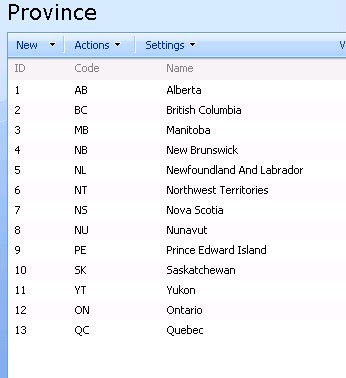
To explore this let's first create a simple Province custom list:
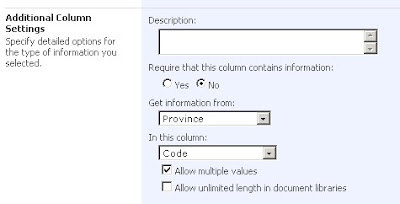
Next we create a multi-lookup site column named "AvailableProvinces" referencing the Province list:
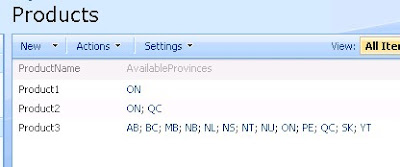
Then we create another custom list to use this "AvailableProvinces" column, and add three list itmes:
Now we can build a simple console application to test the SPQuery:

We only have two view fields but 24 columns are returned. Also we can see that multiple rows returned for same list item are the multi-lookup result set. That’s the way SharePoint deals with multi-lookup value, and tp_Ordinal column identifies different mulitp-lookup value joined with another list. For example, product2's AvailableProvinces column has value of “ON, QC”, the corresponding SQL query returns two rows of data; product3 includes all provinces thus 13 rows are returned from content database.
So data size of SQL server's return won’t become bigger with more versions, but it will grow if more multi-lookup values are added.
Why database returns more rows than the list item number? Is it returning all versions? It would be nightmare if that's case because the versions will keep growing in product environment. Good news is that SPQuery is only getting latest version, not all versions from database. The extra rows actually are related to Multi-lookup values.
To explore this let's first create a simple Province custom list:

Next we create a multi-lookup site column named "AvailableProvinces" referencing the Province list:

Then we create another custom list to use this "AvailableProvinces" column, and add three list itmes:

Now we can build a simple console application to test the SPQuery:
using System;Start the SQL Server profile and you will notice complicate SQL queries sent to content database. The SQL for the first SPQuery (product1) is:
using System.Text;
using Microsoft.SharePoint;
class Test
{
static void Main()
{
QueryData("http://localhost", "Products", "Product1");
QueryData("http://localhost", "Products", "Product2");
QueryData("http://localhost", "Products", "Product3");
Console.Read();
}
static void QueryData(string siteName, string listName, string productName)
{
using (SPSite site = new SPSite(siteName))
{
using (SPWeb web = site.OpenWeb())
{
SPList list = web.Lists[listName];
SPQuery query = new SPQuery();
query.ViewFields = "<FieldRef Name='ProductName' />";
query.ViewFields += "<FieldRef Name='AvailableProvinces' />";
StringBuilder queryText = new StringBuilder();
queryText.Append("<Where><Eq><FieldRef Name=\"ProductName\"/><Value Type=\"Text\">");
queryText.Append(productName);
queryText.Append("</Value></Eq></Where>");
query.Query = queryText.ToString();
SPListItemCollection items = list.GetItems(query);
Console.WriteLine("Item count: {0}", items.Count);
}
}
}
}
exec sp_executesql N' SELECT t5.*, t7.[MetaInfo] FROM (SELECT DISTINCT t3.*, t4.[tp_Ordinal] , t2.[tp_ID] AS c4, t8.[nvarchar3] AS c4c5 FROM ( SELECT TOP 2147483648 t1.[Type] AS c0,t1.[Id] AS
c2,UserData.[tp_DeleteTransactionId],UserData.[nvarchar3],UserData.[tp_ID],UserData.[tp_CopySource],UserData.[tp_Version],UserData.[tp_IsCurrentVersion],UserData.[tp_Created],CASE
WHEN DATALENGTH(t1.DirName) = 0 THEN t1.LeafName WHEN DATALENGTH(t1.LeafName) = 0 THEN t1.DirName ELSE t1.DirName + N''/'' + t1.LeafName END AS
c1,UserData.[tp_HasCopyDestinations],UserData.[tp_ModerationStatus],UserData.[tp_Level],UserData.[tp_SiteId],UserData.[tp_LeafName],UserData.[tp_CalculatedVersion],UserData.[tp_DirName],t1.[ScopeId]
AS c3,UserData.[int1] FROM UserData LEFT OUTER LOOP JOIN Docs AS t1 WITH(NOLOCK) ON ( 1 = 1 AND UserData.[tp_RowOrdinal] = 0 AND t1.SiteId =
UserData.tp_SiteId AND t1.SiteId = @L2 AND t1.DirName = UserData.tp_DirName AND t1.LeafName = UserData.tp_LeafName AND t1.Level =
UserData.tp_Level AND t1.IsCurrentVersion = 1 AND (1 = 1)) WHERE UserData.tp_ListID=@L4 AND ( (UserData.tp_IsCurrent = 1) ) AND UserData.tp_SiteId=@L2 AND (UserData.tp_DirName=@DN) AND UserData.tp_RowOrdinal=0 AND ((UserData.[nvarchar3] = @L3TXP) AND t1.SiteId=@L2 AND (t1.DirName=@DN)) ORDER BY UserData.[tp_ID] Asc ) AS t3 LEFT OUTER JOIN UserDataJunctions AS t4 ON t3.[tp_SiteId] = t4.[tp_SiteId] AND t3.[tp_DeleteTransactionId] = t4.[tp_DeleteTransactionId] AND t3.[tp_IsCurrentVersion] = t4.[tp_IsCurrentVersion] AND t3.[tp_DirName] = t4.[tp_DirName] AND t3.[tp_LeafName] = t4.[tp_LeafName] AND t3.[tp_CalculatedVersion] = t4.[tp_CalculatedVersion] AND t3.[tp_Level] = t4.[tp_Level] LEFT OUTER JOIN UserDataJunctions AS t2 ON t3.[tp_SiteId] = t2.[tp_SiteId] AND t3.[tp_DeleteTransactionId] = t2.[tp_DeleteTransactionId] AND t3.[tp_IsCurrentVersion] = t2.[tp_IsCurrentVersion] AND t3.[tp_DirName] = t2.[tp_DirName] AND t3.[tp_LeafName] = t2.[tp_LeafName] AND t3.[tp_CalculatedVersion] = t2.[tp_CalculatedVersion] AND t3.[tp_Level] = t2.[tp_Level] AND t4.[tp_Ordinal] = t2.[tp_Ordinal] AND t2.[tp_FieldId] = ''{91b18af0-5ef3-477b-aec1-94ab1f7ddd80}'' LEFT OUTER JOIN AllUserData AS t8 WITH(NOLOCK, INDEX=AllUserData_PK) ON (t8.[tp_ListId] = @L5 AND t8.[tp_Id] = t2.[tp_ID] AND t8.[tp_RowOrdinal] = 0 AND t8.[tp_CalculatedVersion] = 0 AND t8.[tp_DeleteTransactionId] = 0x ) ) AS t5 LEFT OUTER JOIN Docs AS t7 WITH(NOLOCK) ON t7.[SiteId] = t5.[tp_SiteId] AND t7.[DeleteTransactionId] = t5.[tp_DeleteTransactionId] AND t7.[DirName] = t5.[tp_DirName] AND t7.[LeafName] = t5.[tp_LeafName] AND t7.[Level] = t5.[tp_Level] ORDER BY t5.tp_ID Asc,t5.[tp_Ordinal] OPTION (FORCE ORDER) ',N'@L0 uniqueidentifier,@L2 uniqueidentifier,@L3TXP nvarchar(255),@DN nvarchar(260),@L4 uniqueidentifier,@L5 uniqueidentifier',@L0='00000000-0000-0000-0000-000000000000',@L2='CC8A9551-7819-4148-B73D-9DBA0A472335',@L3TXP=N'Product1',@DN=N'/Lists/Products',@L4='60D40990-B719-443F-9CFD-7511BCE6B0D5',@L5='EFF07396-C855-4D93-BBFE-2334B7A3CF68'

We only have two view fields but 24 columns are returned. Also we can see that multiple rows returned for same list item are the multi-lookup result set. That’s the way SharePoint deals with multi-lookup value, and tp_Ordinal column identifies different mulitp-lookup value joined with another list. For example, product2's AvailableProvinces column has value of “ON, QC”, the corresponding SQL query returns two rows of data; product3 includes all provinces thus 13 rows are returned from content database.
So data size of SQL server's return won’t become bigger with more versions, but it will grow if more multi-lookup values are added.
Tuesday, June 29, 2010
SharePoint List GetDataTable Extension Methods
In SharePoint there's a SPList.Items.GetDataTable() method returning a DataTable with all list items. However the DataTable doesn't include all hidden fields. This may cause problems if you need to access some of those hidden fields. For example in one of our SharePoint solutions, we have custom caching mechanism relying on SPListItems' last Modified time stored in the hidden Modified field.
To resolve the problem I wrote some extension methods, and all SharePoint list data, no matter hidden or not, will be returned with a simple call of SPList.GetDataTableWithHiddenFields().
Code:
Note: the optional "excludedColumns" parameter defines the fields that you don't want to include in the DataTable.
To resolve the problem I wrote some extension methods, and all SharePoint list data, no matter hidden or not, will be returned with a simple call of SPList.GetDataTableWithHiddenFields().
Code:
using System;
using System.Collections.Generic;
using System.Linq;
using System.Text;
using System.Data;
using Microsoft.SharePoint;

public static class SPListExtension
{
    private const uint SPQueryItemLimit = 2000;

    /// <summary>
    /// Get a .NET type for SPField
    /// </summary>
    private static Type GetFieldType(SPField field)
    {
        Type type = Type.GetType("System.String");

        SPFieldType fieldType = field.Type;
        switch (fieldType)
        {
            case SPFieldType.Integer:
            case SPFieldType.Counter:
                type = Type.GetType("System.Int32");
                break;
            case SPFieldType.Text:
            case SPFieldType.Note:
            case SPFieldType.Choice:
            case SPFieldType.Lookup:
            case SPFieldType.Boolean:
                type = Type.GetType("System.String");
                break;
            //case SPFieldType.Boolean:
            //    type = Type.GetType("System.Boolean");
            //    break;
            case SPFieldType.DateTime:
                type = Type.GetType("System.DateTime");
                break;
            case SPFieldType.Number:
            case SPFieldType.Currency:
                type = Type.GetType("System.Double");
                break;
            default:
                type = Type.GetType("System.String");
                break;
        }
        return type;
    }

    /// <summary>
    /// Remove IDs from lookup fields
    /// "1;#CODE1" => "CODE1"
    /// Skip for LookupMulti fields
    /// </summary>
    public static string TryGetLookupCode(string value)
    {
        string reval = value;
        if (!string.IsNullOrEmpty(value))
        {
            string[] valueSplit = value.Split(new string[] { ";#" },
                     StringSplitOptions.RemoveEmptyEntries);
            int number;
            if (valueSplit.Length == 2 && int.TryParse(valueSplit[0], out number) && number >= 0)
            {
                return valueSplit[1];
            }
        }
        return reval;
    }

    /// <summary>
    /// Extension method for generating DataTable based on SPList schema
    /// </summary>
    public static DataTable GetDataTableSchema(this SPList list)
    {
        string[] exludedColumns = new string[] { };
        return GetDataTableSchema(list, exludedColumns);
    }

    /// <summary>
    /// Dynamically create a DataTable based on SPList schema
    /// </summary>
    public static DataTable GetDataTableSchema(this SPList list, string[] excludedColumns)
    {
        bool hasExcludedColumns = (excludedColumns != null && excludedColumns.Length > 0);
        DataTable dataTable = new DataTable(list.Title);
        foreach (SPField field in list.Fields)
        {
            Type fieldType = GetFieldType(field);
            if (!hasExcludedColumns || !excludedColumns.Contains(field.InternalName,
                StringComparer.InvariantCultureIgnoreCase))
            {
                dataTable.Columns.Add(field.InternalName, fieldType);
            }
        }
        return dataTable;
    }

    /// <summary>
    /// Extension method to get DataTable from SPList with hidden fields
    /// </summary>
    public static DataTable GetDataTableWithHiddenFields(this SPList list)
    {
        string[] exludedColumns = new string[] { };
        return GetDataTableWithHiddenFields(list, exludedColumns);
    }

    /// <summary>
    /// SPList.Items.GetDataTable doesn't include hidden fields
    /// This extension method returns all fields' data
    /// </summary>
    public static DataTable GetDataTableWithHiddenFields(this SPList list, string[] excludedColumns)
    {
        if (list.ItemCount == 0)
            return null;

        bool hasExcludedColumns = excludedColumns != null && excludedColumns.Length > 0;
        DataTable dataTable = new DataTable(list.Title);
        Dictionary<string, SPFieldType> fieldDict = new Dictionary<string, SPFieldType>();
        List<SPListItemCollection> allListItems = new List<SPListItemCollection>();

        // Generate DataTable
        foreach (SPField field in list.Fields)
        {
            if (!hasExcludedColumns || !excludedColumns.Contains(field.InternalName,
                StringComparer.InvariantCultureIgnoreCase))
            {
                fieldDict.Add(field.InternalName, field.Type);
                Type type = GetFieldType(field);
                dataTable.Columns.Add(field.InternalName, type);
            }
        }

        // Query data
        SPQuery spQuery = new SPQuery();
        spQuery.RowLimit = SPQueryItemLimit;
        spQuery.ViewAttributes = "Scope=\"Recursive\"";
        do  // Get all list items
        {
            SPListItemCollection itemCollection = list.GetItems(spQuery);
            if (itemCollection != null && itemCollection.Count > 0)
                allListItems.Add(itemCollection);
            spQuery.ListItemCollectionPosition = itemCollection.ListItemCollectionPosition;
        } while (spQuery.ListItemCollectionPosition != null);

        // Populate DataTable with query results
        Type stringType = Type.GetType("System.String");
        foreach (SPListItemCollection listItems in allListItems)
        {
            foreach (SPListItem item in listItems)
            {
                DataRow dr = dataTable.NewRow();
                foreach (DataColumn column in dataTable.Columns)
                {
                    string columnName = column.ColumnName;
                    if (!Convert.IsDBNull(item[columnName]) && item[columnName] != null)
                    {
                        SPFieldType fieldType = fieldDict[columnName];
                        if (fieldType == SPFieldType.Boolean)
                        {
                            dr[columnName] = Convert.ToBoolean(item[columnName]) ? "1" : "0";
                        }
                        else if (fieldType == SPFieldType.Lookup || fieldType == SPFieldType.Invalid)
                        {
                            dr[columnName] = TryGetLookupCode(item[columnName].ToString());
                        }
                        else if (column.DataType == stringType)
                        {
                            dr[columnName] = item[columnName].ToString();
                        }
                        else
                        {
                            dr[columnName] = item[columnName];
                        }
                    }
                }
                dataTable.Rows.Add(dr);
            }
        }
        return dataTable;
    }
}
Note: the optional "excludedColumns" parameter defines the fields that you don't want to include in the DataTable.
Monday, June 21, 2010
Intall SharePoint 2010 In Windows 7 Virtual Machine
SharePoint 2010 RTM is out there for about two months. I didn't see any issue during the installation on my desktop with Windows 2008 R2. I also wanted to setup a SP2010 environment in my laptop with Windows 7 64-bit. Direct installation of this mess product on my Windows 7 was not an option for me, so I decided to install SP2010 to a virtual machine.
The problem came up because Windows 7 doesn't support Hyper-V and Windows Virtual PC doesn't support 64-bit system, but SP2010 must run in 64-bit environment. So you can not install SP2010 in a virtual machine run inside Windows 7 with Microsoft products. What a Broken As Designed (B.A.D.)!
The solutions go to non-Microsoft products. My first try, the free VMWare Server version 2.0.1 (http://www.microsoft.com/downloads/details.aspx?displaylang=en&FamilyID=751fa0d1-356c-4002-9c60-d539896c66ce), was successful without big issues. Following are steps of my installation:
1. Install VMWare Server 2.0.1 with default settings.
2. Go to VMWare Web Access admin page (http://machineName:8222/ui) and select "Virtual Machine -> Create Virtual Machine" with following settings:
4. Activate Windows Server 2008 SP2 and install import updates.
5. Install SQL Server 2008 SP1 64-bit.
6. Install SharePoint 2010 RTM using "Server Farm" and "Complete" setting.
6.1 Skip this step if you run the SharePoint with domain account.
I want to use a local account to run SP2010 in my VM, but it's not allowed by default. So I need to install SharePoint configuration database using PowerShell. Click SharePoint 2010 management shell, Type "New-SPConfigurationDatabase", it failed and prompted something like SQL Server version is too low. Google and install SQL Server 2008 Cumulative update(http://support.microsoft.com/kb/963036). Rerun "New-SPConfigurationDatabase" but still failed with message of "User does not exist or is not unique...". Google and found it's related to Administrator account. Create a separate "SVC_SharePoint" account to connect to the database, then run "New-SPConfigurationDatabase" with success.
7. Run SharePoint configuration Wizard
8. Install important updates
9 (optional). Install Visual Studio 2010
10 (optional). Install Office 2010
The total disk usage after all above installation is about 29G, and the memory consumption after reboot is about 1G. The whole VM is installed in an external USB 2.0 hard disk. The speed is satisfactory.
The problem came up because Windows 7 doesn't support Hyper-V and Windows Virtual PC doesn't support 64-bit system, but SP2010 must run in 64-bit environment. So you can not install SP2010 in a virtual machine run inside Windows 7 with Microsoft products. What a Broken As Designed (B.A.D.)!
The solutions go to non-Microsoft products. My first try, the free VMWare Server version 2.0.1 (http://www.microsoft.com/downloads/details.aspx?displaylang=en&FamilyID=751fa0d1-356c-4002-9c60-d539896c66ce), was successful without big issues. Following are steps of my installation:
1. Install VMWare Server 2.0.1 with default settings.
2. Go to VMWare Web Access admin page (http://machineName:8222/ui) and select "Virtual Machine -> Create Virtual Machine" with following settings:
- Guest OS: "Microsoft Windows Server 2008 (64-bit)" (I want to install 2008 R2 initially but it's not included in the dropdown list).
- Memory size: 2G, Processors count: 2.
- "Create a New Virtual Disk" with disk capacity of 40G. "Policies -> Optimize for performance" on the same disk configuration page.
- "Add a Network Adapter" with default "Bridged" network connection.
- "Use a Physical Drive"
- "Don't Add a Floppy Drive"
- "Add a USB Controller"
4. Activate Windows Server 2008 SP2 and install import updates.
5. Install SQL Server 2008 SP1 64-bit.
6. Install SharePoint 2010 RTM using "Server Farm" and "Complete" setting.
6.1 Skip this step if you run the SharePoint with domain account.
I want to use a local account to run SP2010 in my VM, but it's not allowed by default. So I need to install SharePoint configuration database using PowerShell. Click SharePoint 2010 management shell, Type "New-SPConfigurationDatabase", it failed and prompted something like SQL Server version is too low. Google and install SQL Server 2008 Cumulative update(http://support.microsoft.com/kb/963036). Rerun "New-SPConfigurationDatabase" but still failed with message of "User does not exist or is not unique...". Google and found it's related to Administrator account. Create a separate "SVC_SharePoint" account to connect to the database, then run "New-SPConfigurationDatabase" with success.
7. Run SharePoint configuration Wizard
8. Install important updates
9 (optional). Install Visual Studio 2010
10 (optional). Install Office 2010
The total disk usage after all above installation is about 29G, and the memory consumption after reboot is about 1G. The whole VM is installed in an external USB 2.0 hard disk. The speed is satisfactory.
Friday, May 28, 2010
SharePoint SPList.LastItemModifiedDate And SPWeb.LastItemModifiedDate Are UTC Time
In SharePoint API, a SPList object has a LastItemModifiedDate property that indicates the last item modified time. The MSDN description for this property is: Gets the date and time that an item, field, or property of the list was last modified.
We use this property to validate the memory cache in one project, but the cache is not properly updated when the list item is changed. Finally we figured out this property returns a UTC time not a local time. To correct the issue, simply use the ToLocalTime method:
In fact, all DateTime values stored in SQL Server, such as list item's "Modified" time, are in UTC format. SharePoint will convert it back to local time:
We use this property to validate the memory cache in one project, but the cache is not properly updated when the list item is changed. Finally we figured out this property returns a UTC time not a local time. To correct the issue, simply use the ToLocalTime method:
DateTime listLastUpdate = list.LastItemModifiedDate.ToLocalTime();Similarly, SPWeb.LastItemModifiedDate is also UTC time, and you need to convert it to local time manually when you use it in the code.
In fact, all DateTime values stored in SQL Server, such as list item's "Modified" time, are in UTC format. SharePoint will convert it back to local time:
SPListItem item = list.Items[0];I don't see any reason why this LastItemModifiedDate property is using UTC format. My guess is that the time is not parsed by database value, instead is created something like this in code behind:
DateTime modifiedTime = Convert.ToDateTime(item["Modified"]);
Is it a bug only existing in SharePoint 2007? I checked the latest SharePoint 2010 RTM release (build number 14.0.4762). To my surprise, they're still UTC time. Maybe MS should document them or give explanation for any such inconsistent stuff inside API.
DateTime listModifiedDate = new DateTime(value from database);
Saturday, May 15, 2010
SQL Server Vs MongoDB - Performance Perspective
Relational database such as SQL Server would be slower than NoSQL solutions. That's understandable. Relational database has its focus and ACID has its cost. But I didn't expect their performance gap is so big until I did some real tests.
The test machine is the same I tested on MongoDB last time:
The insert operations were just too slow. Is there anything going wrong with my machine? I installed all Windows/SQL Server important updates, and disable almost all unnecessary processes, deflagment disk, and redid the test. But the result is still very disappointing, less than 400 insert per second.
Then I tried a few options:
1. Change id to be non-clustered index: no big difference
2. Change id type from uniqueidentifier to varchar(40): no big difference
3. Add an extra identity integer column (primary key): no big difference
4. Change key/value from varchar(40) to char(40): no big difference
5. Change key's index fillfactor to 10, 30, 60, 80, 100: slightly difference among them
6. Do insertion using SQL Script:
8. Use stored procedure: improve a little
9. Change Key's unique non-clustered index to non-clustered index: improve a little.
10. Change database recovery model from full to simple: improve a little
The maximum insertion speed could reach around 900 per second after all kind of tuning in my local machine. That's not even close to MongoDB, and I didn't do any extra work to achieve 200000+ insertions/sec.
Googled and found that actually many people are having the same problem. The article SQL Server Slow Performance on Insert compiles a few resources on the topic of slow insertion in SQL Server.
Anyway I was patient enough to wait the 1-million records being inserted. Then I did the rest of the test with following results (local test):
The test machine is the same I tested on MongoDB last time:
- OS: Windows Server 2008 64-bit SP2
- CPU: Intel i5 750
- Memory: 6G
- DB: SQL Server 2008 Enterprise edition SP1.
id -- uniqueidentifier (Clustered index)MongoDB test code was modified to test SQL Server. I ran the console and was eager to see the results. But the first test case of inserting 1-million records in local database seemed to be never completed.
key -- varchar(40) (Unique non-clustered index)
value -- varchar(40) (no indexing)
The insert operations were just too slow. Is there anything going wrong with my machine? I installed all Windows/SQL Server important updates, and disable almost all unnecessary processes, deflagment disk, and redid the test. But the result is still very disappointing, less than 400 insert per second.
Then I tried a few options:
1. Change id to be non-clustered index: no big difference
2. Change id type from uniqueidentifier to varchar(40): no big difference
3. Add an extra identity integer column (primary key): no big difference
4. Change key/value from varchar(40) to char(40): no big difference
5. Change key's index fillfactor to 10, 30, 60, 80, 100: slightly difference among them
6. Do insertion using SQL Script:
DECLARE @id uniqueidentifierno big difference
DECLARE @Count int, @Max int
SET @Count = 0
SET @Max = 1000000
WHILE @Count < @Max
BEGIN
SET @id = NEWID()
INSERT INTO testTable (id, key, value) VALUES (@id, @id, @id)
SET @Count = @Count + 1
END
8. Use stored procedure: improve a little
9. Change Key's unique non-clustered index to non-clustered index: improve a little.
10. Change database recovery model from full to simple: improve a little
The maximum insertion speed could reach around 900 per second after all kind of tuning in my local machine. That's not even close to MongoDB, and I didn't do any extra work to achieve 200000+ insertions/sec.
Googled and found that actually many people are having the same problem. The article SQL Server Slow Performance on Insert compiles a few resources on the topic of slow insertion in SQL Server.
Anyway I was patient enough to wait the 1-million records being inserted. Then I did the rest of the test with following results (local test):
Insert: 900/SecondBesides the non-indexed column search (table scan), only the search on clustered-indexed column in SQL Server is comparable to MongoDB's.
Update: 1500/Second
Search on clustered-indexed column: 9000/Second
Search on non-clusterd indexed column: 2000/Second
Search on Non-indexed column: 27/Second
Sunday, May 02, 2010
Test MongoDB In Windows Environment
NoSQL movement becomes more and more popular. Nowadays most NoSQL product environments are Unix-based. MongoDB is one of few solutions that provide Windows installation and .NET provider. This exercise evalutes MongoDB's performance in Windows platform.
The test machines' configuration:
A simple document with key (unique-indexed) value (non-indexed) pair is used for testing. All fields (including internal _id field) will store GUID value:
Local tests are conducted inside one physical machine. MongoDB server and client process are running in separated machines in remote tests, and connection between server and client machines are 100Mbit/Sec.
Local test results:
Remote test results:
Findings:
I thought the relatively low speed of indexed search in our test results could be caused by my single-threaded test application. So I modified the code and did the tests with 2, 4, 6, 8 and 10 threads. But surprisingly the performance did not improve at all.
The test code is listed below. It is simple and may be not accurate enough. But it gave me an idea how it performs in general with Windows environment.
Test code:
The test machines' configuration:
- OS: Windows Server 2008 64-bit SP2
- CPU: Intel i5 750
- Memory: 6G
- MongoDB: 1.4.2 64-bit (http://dl.mongodb.org/dl/win32/x86_64)
- MongoDB Driver: MongoDB-CSharp 0.82 (http://github.com/samus/mongodb-csharp)
A simple document with key (unique-indexed) value (non-indexed) pair is used for testing. All fields (including internal _id field) will store GUID value:
{
_id: "12345678-1234-1234-1234-123456789012",  // Internal field
key: "12345678-1234-1234-1234-123456789012",  // Unique-indexed
value: "12345678-1234-1234-1234-123456789012" // Non-indexed
}
Manually handling "_id" field without using Oid format is not recommended. The reason of doing that in our tests is efficiently do update and delete operations without extra search.Local tests are conducted inside one physical machine. MongoDB server and client process are running in separated machines in remote tests, and connection between server and client machines are 100Mbit/Sec.
Local test results:
(All in document actions per second, 1M=1000000)
| Document number | 1M | 2M | 4M | 8M | 10M |
| Insert | 32210 | 29540 | 27160 | 22100 | 20530 |
| Update | 18560 | 18160 | 18010 | 17900 | 17540 |
| Delete | 12660 | 12510 | 11980 | 11610 | 11550 |
| Search on _id | 13340 | 13330 | 13350 | 12990 | 12130 |
| Search on key | 9190 | 9280 | 9300 | 9110 | 9010 |
| Search on value | 7.2 | 3.6 | 1.8 | 0.9 | 0.7 |
Remote test results:
| Document number | 1M | 2M | 4M | 8M | 10M |
| Insert | 31450 | 30700 | 22420 | 18810 | 17600 |
| Update | 18180 | 18160 | 17400 | 18100 | 17830 |
| Delete | 12550 | 12270 | 11730 | 11680 | 11530 |
| Search on _id | 2410 | 2440 | 2410 | 2420 | 2420 |
| Search on key | 1470 | 1470 | 1450 | 1450 | 1440 |
| Search on value | 7.2 | 3.6 | 1.8 | 0.9 | 0.7 |
Findings:
- Fastest operation is data insert.
- Search on _id is faster than search on other indexed field.
- Search on indexed field seems in constant time, not proportional to size of the data set.
- Search on non-indexed field shows very poor performance, and the time spent is proportional to the size the data set. This is similar to a table scan scenario in a relational database.
- There's no big gap in insert/update/delete between local test and remote test.
- Remote search is significantly slower than local search.
I thought the relatively low speed of indexed search in our test results could be caused by my single-threaded test application. So I modified the code and did the tests with 2, 4, 6, 8 and 10 threads. But surprisingly the performance did not improve at all.
The test code is listed below. It is simple and may be not accurate enough. But it gave me an idea how it performs in general with Windows environment.
Test code:
using System;
using System.Collections.Generic;
using System.Configuration;
using System.Diagnostics;
using System.Threading;
using MongoDB.Driver;

public class Program
{
    struct TimeUnit
    {
        public int NumberOfRecords;
        public long MilliSeconds;
        public TimeUnit(int num, long ms)
        {
            NumberOfRecords = num;
            MilliSeconds = ms;
        }
    }
    const int MaxDocuments = 1000000;
    const int NonIndexSearchCount = 1000;
    const int ThreadCount = 1;
    const string DBConnectionString = "Server=127.0.0.1";
    const string DBName = "TestMongoDB";
    const string DBCollectionName = "TestCollection";
    static string[] testContent = new string[MaxDocuments];
    static object lockObject = new object();
    static Dictionary<string, List<TimeUnit>> resultTimes = new Dictionary<string, List<TimeUnit>>();

    static void Main(string[] args)
    {
        // Initialize data
        for (int i = 0; i < MaxDocuments; i++)
            testContent[i] = Guid.NewGuid().ToString();

        // Start Threads
        List<Thread> threads = new List<Thread>();
        for (int i = 0; i < ThreadCount; i++)
        {
            int max = MaxDocuments / ThreadCount;
            int insertStart = i * max;
            int searchStart = insertStart + max / 2;
            int searchEnd = searchStart + max / 10;
            Thread thread = new Thread(() => TestMongoDB(insertStart, searchStart, searchEnd, max));
            thread.Start();
            threads.Add(thread);
            //ThreadPool.QueueUserWorkItem(o => TestMongoDB(insertStart, searchStart, searchEnd, max));
        }
        Console.WriteLine();
        // Wait threads to be completed
        foreach (Thread thread in threads)
            thread.Join();

        // Display results
        Console.WriteLine("Results:");
        foreach (var key in resultTimes.Keys)
        {
            List<TimeUnit> times = resultTimes[key];
            Console.Write(key + ":");
            long totalTime = 0, totalNumber = 0;
            foreach (TimeUnit st in times)
            {
                totalTime += st.MilliSeconds;
                totalNumber += st.NumberOfRecords;
                Console.Write(st.MilliSeconds + " ");
            }
            Console.WriteLine(string.Format("{0} speed is : {1}/sec", key, totalNumber * 1000.0 / totalTime));
        }
        Console.WriteLine("Done");
        Console.Read();
    }

    /// <summary>
    /// MongoDB test. Document format:
    /// {
    ///     _id,    // internal field
    ///     key,    // indexed field
    ///     value   // non-indexed field
    /// }
    /// </summary>
    static void TestMongoDB(int insertStart, int searchStart, int searchEnd, int max)
    {
        // Init MongoDB
        Mongo mongo = new Mongo(DBConnectionString);
        IMongoDatabase db;
        IMongoCollection documents;
        Document doc = new Document();
        Stopwatch watch = new Stopwatch();

        mongo.Connect();
        db = mongo[DBName];
        documents = db.GetCollection(DBCollectionName);

        // Setup Index on key field
        lock (lockObject)
        {
            if (!documents.MetaData.Indexes.ContainsKey("key"))
            {
                Document indexDoc = new Document { { "key", 1 } };
                documents.MetaData.CreateIndex(indexDoc, true);
            }
        }

        // Insert data
        watch.Start();
        for (int i = insertStart; i < insertStart + max; i++)
        {
            Document newdoc = new Document();
            newdoc["_id"] = newdoc["key"] = newdoc["value"] = testContent[i];
            documents.Insert(newdoc);
        }
        watch.Stop();
        AddTimeUnit("insert", new TimeUnit(max, watch.ElapsedMilliseconds));
        Console.WriteLine(string.Format("MongoDB insert {0} records: {1} ms",
           max, watch.ElapsedMilliseconds.ToString()));
        watch.Reset();

        // Search on id field
        watch.Start();
        for (int i = searchStart; i < searchEnd; i++)
        {
            doc["_id"] = testContent[i];
            var doc1 = documents.FindOne(doc);
            string value = doc1["value"].ToString();
        }
        watch.Stop();
        AddTimeUnit("search-id", new TimeUnit(searchEnd - searchStart, watch.ElapsedMilliseconds));
        Console.WriteLine(string.Format("MongoDB {0} search on id field over {1} records: {2} ms",
           searchEnd - searchStart, documents.Count(), watch.ElapsedMilliseconds));
        watch.Reset();
        doc = new Document();

        // Search on indexed "key" field
        watch.Start();
        for (int i = searchStart; i < searchEnd; i++)
        {
            doc["key"] = testContent[i];
            var doc1 = documents.FindOne(doc);
            string value = doc1["value"].ToString();
        }
        watch.Stop();
        AddTimeUnit("search-key", new TimeUnit(searchEnd - searchStart, watch.ElapsedMilliseconds));
        Console.WriteLine(string.Format("MongoDB {0} search on indexed field over {1} records: {2} ms",
           searchEnd - searchStart, documents.Count(), watch.ElapsedMilliseconds));
        watch.Reset();
        doc = new Document();

        // Search on non-indexed "value" field
        watch.Start();
        for (int i = searchStart; i < searchStart + NonIndexSearchCount; i++)
        {
            doc["value"] = testContent[i];
            var doc1 = documents.FindOne(doc);
            string value = doc1["value"].ToString();
        }
        watch.Stop();
        AddTimeUnit("search-value", new TimeUnit(NonIndexSearchCount, watch.ElapsedMilliseconds));
        Console.WriteLine(string.Format("MongoDB {0} search on non-indexed field over {1} records: {2} ms",
          NonIndexSearchCount, documents.Count(), watch.ElapsedMilliseconds));
        watch.Reset();
        doc = new Document();

        // Update test
        watch.Start();
        for (int i = searchStart; i < searchEnd; i++)
        {
            doc["_id"] = testContent[i];
            //var doc1 = documents.FindOne(doc);
            doc["key"] = testContent[i];
            doc["value"] = i.ToString();
            documents.Update(doc);
        }
        watch.Stop();
        AddTimeUnit("update", new TimeUnit(searchEnd - searchStart, watch.ElapsedMilliseconds));
        Console.WriteLine(string.Format("MongoDB {0} update over {1} records: {2} ms",
           searchEnd - searchStart, documents.Count(), watch.ElapsedMilliseconds));
        watch.Reset();
        doc = new Document();

        // Delete test
        watch.Start();
        for (int i = searchStart; i < searchEnd; i++)
        {
            doc["_id"] = testContent[i];
            //var doc1 = documents.FindOne(doc);
            documents.Delete(doc);
        }
        watch.Stop();
        AddTimeUnit("delete", new TimeUnit(searchEnd - searchStart, watch.ElapsedMilliseconds));
        Console.WriteLine(string.Format("MongoDB {0} delete over {1} records: {2} ms",
           searchEnd - searchStart, documents.Count(), watch.ElapsedMilliseconds));
    }

    private static void AddTimeUnit(string key, TimeUnit st)
    {
        lock (lockObject)
        {
            if (resultTimes.ContainsKey(key))
            {
                List<TimeUnit> times = resultTimes[key];
                times.Add(st);
            }
            else
            {
                List<TimeUnit> times = new List<TimeUnit>();
                times.Add(st);
                resultTimes.Add(key, times);
            }
        }
    }
}
Tuesday, April 27, 2010
A SharePoint Feature To Configurate Content Deployment Timout Setting
The default timeout setting in SharePoint 2007 content deployment is 10 minutes. For content deployment on a big site, this may not be long enough, and you may get a timeout exception during the content deployment. The bad news is that you can't change the content deployment timeout setting with stsadm.exe, and you must run custom code to talk with SharePoint API to update this setting. Stefan Gossner provides a console application for such task. But console application is so flexible to reality. Not many admins like the idea of running a console application to update a setting for SharePoint in production environment.
It would be good if we can make the configuration change by browser, idealy a page linked to content deployment section in central administration web site. In this practice I will wrap all that as a SharePoint Feature.
First we need to define the feature.xml:The screen-shot of the central admin configuration page:

The screen-shot of timeout setting page:

It would be good if we can make the configuration change by browser, idealy a page linked to content deployment section in central administration web site. In this practice I will wrap all that as a SharePoint Feature.
First we need to define the feature.xml:
<?xml version="1.0" encoding="utf-8"?>In order to add a link in Content Deployment section in SharePoint central admin, the Feature needs to include a custom action. The elements.xml is as following:
<Feature Id="02ca3716-5938-4788-ad67-17e6039f93da"
Title="Content Deployment Timeout Configuration"
Description="Timeout setting for content deployment"
Version="1.0.0.0"
Hidden="FALSE"
Scope="Farm"
DefaultResourceFile="core"
xmlns="http://schemas.microsoft.com/sharepoint/">
<ElementManifests>
<ElementManifest Location="elements.xml"/>
</ElementManifests>
</Feature>
<?xml version="1.0" encoding="utf-8" ?>The UrlAction is pointing to the /_admin/CDTimeoutSetting.aspx page which includes a simple UI for timeout update:
<Elements xmlns="http://schemas.microsoft.com/sharepoint/">
<CustomAction
Id="Content.Deployment"
GroupId="ContentDeployment"
Location="Microsoft.SharePoint.Administration.Operations"
Sequence="510"
Title="Content deployment timeout setting">
<UrlAction Url="/_admin/CDTimeoutSetting.aspx" />
</CustomAction>
</Elements>
<%@ Page Language="C#" MasterPageFile="~/_admin/admin.master" %>The manifext.xml for packaking the Feature to a wsp solution package:
<%@ Assembly Name="Microsoft.SharePoint, Version=12.0.0.0, Culture=neutral,PublicKeyToken=71e9bce111e9429c" %>
<%@ Assembly Name="Microsoft.SharePoint.ApplicationPages.Administration, Version=12.0.0.0, Culture=neutral, PublicKeyToken=71e9bce111e9429c" %>
<%@ Assembly Name="Microsoft.SharePoint.Publishing, Version=12.0.0.0, Culture=neutral, PublicKeyToken=71e9bce111e9429c"%>
<%@ Assembly Name="System.Web, Version=2.0.0.0, Culture=neutral, PublicKeyToken=b03f5f7f11d50a3a" %>
<%@ Import Namespace="Microsoft.SharePoint" %>
<%@ Import Namespace="System.Web.UI" %>
<%@ Import Namespace="Microsoft.SharePoint.Publishing.Administration" %>
<asp:Content ID="Content2" runat="server" ContentPlaceHolderID="PlaceHolderPageTitleInTitleArea">
Manage Content Deployment Remote Timeout Setting
</asp:Content>
<asp:Content ID="Content4" runat="server" ContentPlaceHolderID="PlaceHolderMain">
<div style="margin: 15" runat="server" id="divMain">
<div>
<p>
<asp:Label ID="lblInfo" runat="server"></asp:Label>
<asp:Label ID="lblCurrentTimeout" runat="server" Font-Bold="true"></asp:Label>
</p>
<br />
<p>
<asp:Label ID="Label2" runat="server">Set timeout in minutes</asp:Label>
<asp:TextBox ID="txtTimeout" runat="server"></asp:TextBox>
<asp:RequiredFieldValidator ID="RequiredFieldValidator1" runat="server" Text="* Required" ErrorMessage="Required" ControlToValidate="txtTimeout" Display="Dynamic" ValidationGroup="update"></asp:RequiredFieldValidator>
<asp:RangeValidator ID="RangeValidator1" runat="server" ErrorMessage="Invalid (1-240)" ControlToValidate="txtTimeout" Display="Dynamic" Type="Integer" MinimumValue="1" MaximumValue="7200" ValidationGroup="update"></asp:RangeValidator>
<asp:Button ID="btnUpdate" runat="server" Text="Update" ValidationGroup="update" OnClick="btnUpdate_Click" />
</p>
</div>
</div>
</asp:Content>
<script runat="server">
ContentDeploymentConfiguration config = null;
void btnUpdate_Click(object sender, EventArgs e)
{
if (config == null)
{
config = ContentDeploymentConfiguration.GetInstance();
}
Microsoft.SharePoint.Administration.SPWebApplication wa = SPContext.Current.Site.WebApplication;
wa.FormDigestSettings.Enabled = false;
SPContext.Current.Web.AllowUnsafeUpdates = true;
config.RemoteTimeout = Convert.ToInt32(txtTimeout.Text) * 60;
config.Update();
SPContext.Current.Web.AllowUnsafeUpdates = false;
}
void Page_PreRender(object sender, System.EventArgs e)
{
if (SPContext.Current == null || SPContext.Current.Site == null || SPContext.Current.Web == null)
{
lblInfo.Text = "Invalid SPContext. Please sign in and try again.";
return;
}
if (config == null)
{
config = ContentDeploymentConfiguration.GetInstance();
}
lblCurrentTimeout.Text = string.Format("Current timeout setting is: {0} minutes", Convert.ToString(config.RemoteTimeout / 60));
}
</script>
<?xml version="1.0"?>
<Solution SolutionId="04a13d4d-21e2-4e72-a65c-163b16e8bbc8" xmlns="http://schemas.microsoft.com/sharepoint/">
  <FeatureManifests>
    <FeatureManifest Location="ContentDeploymentTimeoutSetter\feature.xml" />
  </FeatureManifests>
  <TemplateFiles>
    <TemplateFile Location="ADMIN\CDTimeoutSetting.aspx" />
  </TemplateFiles>
</Solution>

The screen-shot of timeout setting page:

Friday, April 23, 2010
SharePoint Feature List Page
In some cases, once the site is created and properly configured, system admins don't want end users, not even site collection administrators, to touch the SharePoint Features for security and other reasons. We built a custom SharePoint solution with custom site definition. System admin requested to set all our custom Features to be hidden so that those Features won't be able to be activated or deactivated by users. Admins themselves like to use stsadm or some other tools to control those features.
All set and everything is okay, except you can not see those Feature status in site settings' pages. So I created a Feature List application page specific for this:

Code:
All set and everything is okay, except you can not see those Feature status in site settings' pages. So I created a Feature List application page specific for this:

Code:
<%@ Page Language="C#" Inherits="Microsoft.SharePoint.WebControls.LayoutsPageBase" %>
<%@ Assembly Name="System, Version=2.0.0.0, Culture=neutral, PublicKeyToken=b77a5c561934e089" %>
<%@ Assembly Name="System.Web, Version=2.0.0.0, Culture=neutral, PublicKeyToken=b03f5f7f11d50a3a" %>
<%@ Assembly Name="Microsoft.SharePoint, Version=12.0.0.0, Culture=neutral,PublicKeyToken=71e9bce111e9429c" %>
<%@ Assembly Name="Microsoft.SharePoint.ApplicationPages, Version=12.0.0.0, Culture=neutral, PublicKeyToken=71e9bce111e9429c"%>
<%@ Import Namespace="System.Web.UI" %>
<%@ Import Namespace="System.Collections.Generic" %>
<%@ Import Namespace="System.Collections.Specialized" %>
<%@ Import Namespace="Microsoft.SharePoint" %>
<%@ Import Namespace="Microsoft.SharePoint.Utilities" %>
<%@ Import Namespace="Microsoft.SharePoint.Administration" %>
<html xmlns="http://www.w3.org/1999/xhtml">
<head>
<title>SharePoint Feature List</title>
<meta name="ROBOTS" content="NOINDEX, NOFOLLOW">
<meta http-equiv="Content-Type" content="text/html; charset=utf-8">
<meta http-equiv="Content-language" content="en">
<script runat="server">
public class FeatureItem
{
private string _name, _scope, _id;
private bool _hidden;
public string Name { get { return _name; } set { _name = value; } }
public string Scope { get { return _scope; } set { _scope = value; } }
public string ID { get { return _id; } set { _id = value; } }
public bool Hidden { get { return _hidden; } set { _hidden = value; } }
public FeatureItem(string name, string scope, string id, bool hidden)
{
Name = name;
Scope = scope;
ID = id;
Hidden = hidden;
}
}
protected override bool AllowNullWeb { get { return false; } }
protected override bool RequireSiteAdministrator { get { return false; } }
void Page_Load(object sender, System.EventArgs e)
{
if (SPContext.Current == null || SPContext.Current.Site == null || SPContext.Current.Web == null)
{
lblInfo.Text = "Invalid SPContext. Please sign in and try again.";
return;
}
PopulateFeatures();
}
void PopulateFeatures()
{
List<FeatureItem> featureList = new List<FeatureItem>();
string scope = ddlScope.SelectedValue;
Dictionary<string, SPFeatureCollection> activeFeatures = new Dictionary<string, SPFeatureCollection>();
activeFeatures.Add(SPFeatureScope.Farm.ToString(), Microsoft.SharePoint.Administration.SPWebService.ContentService.Features);
activeFeatures.Add(SPFeatureScope.WebApplication.ToString(), SPContext.Current.Site.WebApplication.Features);
activeFeatures.Add(SPFeatureScope.Site.ToString(), SPContext.Current.SiteFeatures);
activeFeatures.Add(SPFeatureScope.Web.ToString(), SPContext.Current.WebFeatures);
if (ddlActive.SelectedValue == "Active")
{
if (scope == "All")
{
foreach (SPFeatureCollection features in activeFeatures.Values)
{
foreach (SPFeature item in features)
{
try
{
string name = string.IsNullOrEmpty(item.Definition.DisplayName) ? item.Definition.Id.ToString() : item.Definition.DisplayName;
FeatureItem fi = new FeatureItem(name,
item.Definition.Scope.ToString(), item.Definition.Id.ToString(), item.Definition.Hidden);
featureList.Add(fi);
}
catch (Exception ex)
{
string name = string.IsNullOrEmpty(item.Definition.DisplayName) ? item.Definition.Id.ToString() : item.Definition.DisplayName;
FeatureItem fi = new FeatureItem(ex.Message, string.Empty, string.Empty, false);
featureList.Add(fi);
}
}
}
}
else
{
SPFeatureCollection features = activeFeatures[scope];
foreach (SPFeature item in features)
{
try
{
string name = string.IsNullOrEmpty(item.Definition.DisplayName) ? item.Definition.Id.ToString() : item.Definition.DisplayName;
FeatureItem fi = new FeatureItem(name,
item.Definition.Scope.ToString(), item.Definition.Id.ToString(), item.Definition.Hidden);
featureList.Add(fi);
}
catch (Exception ex)
{
string name = string.IsNullOrEmpty(item.Definition.DisplayName) ? item.Definition.Id.ToString() : item.Definition.DisplayName;
FeatureItem fi = new FeatureItem(ex.Message, string.Empty, string.Empty, false);
featureList.Add(fi);
}
}
}
}
else //Inavtive
{
foreach (SPFeatureDefinition definition in SPFarm.Local.FeatureDefinitions)
{
Guid featureID = Guid.NewGuid();
string name = string.Empty;
try
{
featureID = definition.Id;
name = string.IsNullOrEmpty(definition.DisplayName) ? featureID.ToString() : definition.DisplayName;
bool isActive = false;
if (activeFeatures[definition.Scope.ToString()] != null)
isActive = (activeFeatures[definition.Scope.ToString()][featureID] != null);
if (!isActive && (scope == "All" || definition.Scope.ToString() == scope))
{
FeatureItem fi = new FeatureItem(name, definition.Scope.ToString(), definition.Id.ToString(), definition.Hidden);
featureList.Add(fi);
}
}
catch (Exception e)
{
FeatureItem fi = new FeatureItem(name + " : " + e.Message, "Invalid", featureID.ToString(), true);
featureList.Add(fi);
}
}
}
featureList.Sort(delegate(FeatureItem item1, FeatureItem item2)
{
return item1.Name.CompareTo(item2.Name);
});
lblTotal.Text = string.Format("Total count: {0}", featureList.Count);
gvFeature.DataSource = featureList;
gvFeature.DataBind();
}
</script>
</head>
<body>
<form id="form1" runat="server">
<div style="margin: 15">
<p>
<asp:Label ID="Label2" runat="server" Text="Feature Status:"></asp:Label>
<asp:DropDownList ID="ddlActive" runat="server" AutoPostBack="true">
<asp:ListItem Selected="True">Active</asp:ListItem>
<asp:ListItem>Inactive</asp:ListItem>
</asp:DropDownList>
<asp:Label ID="Label3" runat="server" Text="Feature Scope:"></asp:Label>
<asp:DropDownList ID="ddlScope" runat="server" AutoPostBack="true">
<asp:ListItem>All</asp:ListItem>
<asp:ListItem>Farm</asp:ListItem>
<asp:ListItem>WebApplication</asp:ListItem>
<asp:ListItem>Site</asp:ListItem>
<asp:ListItem Selected="True">Web</asp:ListItem>
</asp:DropDownList>
<asp:Label ID="lblTotal" runat="server"></asp:Label>
</p>
<p>
<asp:Label ID="lblInfo" runat="server"></asp:Label>
<asp:GridView ID="gvFeature" runat="server" AutoGenerateColumns="False" BorderWidth="1px"
BackColor="White" CellPadding="4" BorderStyle="Solid" BorderColor="#3366CC"
Font-Size="Small" AlternatingRowStyle-ForeColor="ActiveCaption">
<HeaderStyle ForeColor="White" BackColor="#003399" HorizontalAlign="Left">
</HeaderStyle>
<Columns>
<asp:BoundField HeaderText="Feature Name" DataField="Name" ReadOnly="true" ItemStyle-Width="380px">
</asp:BoundField>
<asp:BoundField HeaderText="Scope" DataField="Scope" ReadOnly="true" ItemStyle-Width="120px">
</asp:BoundField>
<asp:BoundField HeaderText="Hidden" DataField="Hidden" ReadOnly="true" ItemStyle-Width="120px">
</asp:BoundField>
<asp:BoundField HeaderText="FeatureID" DataField="ID" ReadOnly="true" ItemStyle-Font-Size="X-Small" ItemStyle-Width="240px">
</asp:BoundField>
</Columns>
<EmptyDataTemplate>
<asp:Label ID="lblEmptyMessage" runat="server" Text="No feature found."></asp:Label>
</EmptyDataTemplate>
</asp:GridView>
</p>
</div>
</form>
</body>
</html>
Subscribe to:
Posts (Atom)