Thursday, November 07, 2013

A Simple Logging Server Implementation Using Node.js and MongoDB

In my previous post I built a logging & reporting module for Windows 8 store apps. In this post I am going to build a simple while fast and scalable logging server.

Open source node.js is used to serve as http logging server. Node.js is a JavaScript server-side solution. It's light, efficient, and using event-driven and non-blocking I/O. These features make it a good fit for logging JSON objects sent by the client.

Traditionally the logging service would just save logs to file system. However it's hard to do data analysis and poor performance to do query over big size of logged data if using plain text file logs. Alternatively we can use document type NoSQL as the data store. In our use case, each log is an independent information unit, and document stores works extremely well in such scenario. Data insert and query would be faster and more efficient than traditional SQL database. We pick MongoDB as it's easy to use in different platform, well documented and has native support to JSON data.

Node.js requires a driver or module to connect to MongoDB database. We use mongojs in our example:

npm install mongojs

The whole logging server implementation is less than 100-line of code:

var http = require('http');
var url = require('url');

var mongojs = require('mongojs');
var db = mongojs('Data');
var collection = db.collection('Logs');

var contentType = {'Content-Type': 'text/html'};
var OK = 'OK', BAD = 'BAD REQUEST';
var MAX_URL_LENGTH = 2048, MAX_POST_DATA = 10240;

function createLog(request) {
    var logObj = {};
    try {
        logObj.time = new Date();
        logObj.method = request.method;
        logObj.host = request.headers.host;
        logObj.url = request.url;
        var queryStrings = url.parse(request.url, true).query;
        // Check if it's an empty object
        if (Object.keys(queryStrings).length) {
            logObj.query = queryStrings;
            for (var attrname in queryStrings) { 
                logObj[attrname] = queryStrings[attrname]; 
            }
        }
    } catch (ex) {}
    return logObj;
}

http.createServer(function (request, response) {
    // Bypass request with URL larger than 2K
    if (request.url.length > MAX_URL_LENGTH) {
        response.writeHead(414, contentType);
        response.end(BAD);
    } else if (request.method == 'GET') {  // HTTP GET
        var logObj = createLog(request);
        if (logObj.query) {
            delete logObj.query;
            collection.save(logObj);
            response.writeHead(200, contentType);
            response.end(OK);
        } else {  // Empty request
            response.writeHead(400, contentType);
            response.end(BAD);
            request.connection.destroy();
        }
    } else if(request.method == 'POST') {  // HTTP POST
        var logObj = createLog(request);
        var postData = '';
        request.on('data', function(data) {
            postData += data;
            // Bypass request with POST data larger than 10K
            if(postData.length > MAX_POST_DATA) {
                postData = "";
                response.writeHead(413, contentType);
                response.end(BAD);
                request.connection.destroy();
            }
        });
        request.on('end', function() {
            if (!postData && !logObj.query) {  // Empty request
                response.writeHead(400, contentType);
                response.end(BAD);
                request.connection.destroy();
            } else {
                if (postData) {
                    try {
                        postObjs = JSON.parse(postData);
                        for (var attrname in postObjs) { 
                            logObj[attrname] = postObjs[attrname]; 
                        }    
                    } catch (ex) {
                        logObj.postData = postData;
                    }
                }
                if (logObj.query) {
                    delete logObj.query;
                }
                collection.save(logObj);
                response.writeHead(200, contentType);
                response.end(OK);
            } 
        });
    }
}).listen(process.env.PORT || 8080);

Friday, November 01, 2013

WinJSLog - A Logging and Reporting JavaScript Module For Windows 8 Store Apps

Background

Usually developers use console.log() or WinJS.Log() function to log error and debug information. But that only helps during debugging in local machine. How about those users who installed your app and had errors or experienced crashes? Microsoft has Quality reports in Windows 8 app's dashboard if its telemetry service is enabled, but that function is quite limited, and it only collects crash data when the user accepts the so called Customer Experience Improvement Program (CEIP). It would be great to have errors and custom data reported to your own server so you can do some investigation at real-time. In this post I will have some discussion on this topic and present an implementation to log and report crashes, errors, and potentially any info you want for a Windows 8 store app.

Why logging and reporting are important for mobile apps?

Is your Mobile app working nicely in different devices? Are there any unexpected issues happening in different environment? The customer feedback is likely your main source of investigation. But that's not something you as a developer should rely on. Some issues may never surface, and people would just uninstall the app when they are not happy on it. Unless for some royal users, no many people would spend their precious time to write feedback or report to help you to improve your application.

Even you are lucky enough to have a nice user having a polite comment like this: "This's a good app! However sometimes it crashes when I am on editing mode. Please fix it.", you have no idea what's the real problem is. You may end up spending countless time just to reproduce the issue in specific situation.

So you want to monitor your app's running issues in real-time, and you want to get as much info when crash or error occurs. When logging service is on board, you may want more data to analyze the customer usage. Then it becomes an analytics framework and you have another communication channel to your app (carefully not to abuse using it).

All that sound to be essential to maintain the app quality for a distributed mobile app. But surprisingly I couldn't find a public available solution online. So I decided to write my own, and I called it WinJSLog. The goal of the implementation is light, effective, and easy to use.

Why an app crashes?

I have discussed WinJS exceptions in a previous post. Basically the unhandled exception will result in app crash by default. Crashes is the worst user experience ever because the running app is suddenly disappear without any prompt and reason to end user. A better experience would be redirect the user to a landing page. People may get confused too "why I am switched to a different place?", but at least the app maintains the running condition, giving user a chance to do other stuff or retry the previous action.

Unhandled exception in Windows 8 can be caught in Windows.Application.onerror global event. Following code snippet shows how to register an event handler to redirect user to a specific page when unhandled exception occurs:

    Windows.Application.onerror = function (e) {
        showErrorPage();
        return true; // telling WinJS that the exception was handled, don't terminate
    }

What data to collect?

Errors like "Object reference is null" is not so helpful. As a development you want as much info as possible to identify an issue, such as the stack trace which provides more context about the error. The device and environment variance could make some issue super hard to figure out. A problem may only happen in one specific device, in one specific language or in one specific screen size.

My implementation includes the error message detail, as well as following context info:

  • application version
  • language
  • device maker
  • device model
  • screen size
  • suspend and resume history
  • page navigation history
  • method invocation history
Above context information could help us to pin point the issues occurring in certain environment. Ideally the memory usage info should be included but I have not figured out how to get that data from WinJS libraries yet.

What's the data format?

Data are collected as key-value JavaScript objects, and JSON is used to transfer the logged data to different media, like file system or cross the network. JSON was born for such usage and it's a total no-brainer. Following JSON data is an example of crash log sent from a Windows 8 test app running in a VMWare virtual machine:

{
    "os" : "Windows 8",
    "version" : "1.0.0.1",
    "manufacturer" : "VMware, Inc.",
    "model" : "VMware Virtual Platform",
    "lang" : "en-CA",
    "screen" : "1680x1050",
    "orientation" : "landscape",
    "timezone" : "-5", 
    "latitude" : "43.666698",
    "longitude" : "-79.416702",
    "logtime" : "November 1, 2013 9:42:56 AM", 
    "pagetrace" : "home[9:42:27AM]=>user[9:42:41AM]=>test[9:42:48AM]",
    "level" : "crash", 
    "log": [ 
            {
             "source" : "promise", 
             "message" : "'username' is undefined", 
             "description" : "'username' is undefined",
             "stacktrace" : "ReferenceError: 'username' is undefined\n 
                at ready (ms-appx://testApp/pages/test/test.js:85:13)\n 
                at Pages_ready (ms-appx://microsoft.winjs.1.0/js/base.js:4511:29)\n
                at notifySuccess (ms-appx://microsoft.winjs.1.0/js/base.js:1404:21)\n 
                at enter (ms-appx://microsoft.winjs.1.0/js/base.js:1091:21)\n
                at _run (ms-appx://microsoft.winjs.1.0/js/base.js:1307:17)\n
                at _completed (ms-appx://microsoft.winjs.1.0/js/base.js:1275:13)\n
                at notifySuccess (ms-appx://microsoft.winjs.1.0/js/base.js:1404:21)\n
                at enter (ms-appx://microsoft.winjs.1.0/js/base.js:1091:21)\n
                at _run (ms-appx://microsoft.winjs.1.0/js/base.js:1307:17)\n
                at _completed (ms-appx://microsoft.winjs.1.0/js/base.js:1275:13)", 
             "level" : "crash", 
             "time":"2013-11-01T14:42:56.438Z"
           }
        ]
}
In next post I will present a simple logging server implementation to handle such requests.

When to send the logged data? What happen if no Internet access?

Crash or unhandled exception is considered serious issue, and the error detail should be sent to the logging server immediately when it happens. For regular error messages or debugging info we could accumulate them and send them out once current page is completed or a different page is visited. There's also a timer process to check and cleanup the pending logs in background (2 minutes by default and is configurable), so the logged message could be delivered even the user stay on one page for a long time.

The logged data will be stored to file system if Internet service is not available. When the application starts up, it will check if such log file(s) exist, if so the log file(s) will be read and send to logging server if Internet is available. Usually there're many operations during the application booting up. To avoid the action congestion, it's a good idea to defer to run the check-and-send action a little bit later than the application launch (30 seconds by default). If the Internet access is not available, the background process will also periodically recheck the network status (2 minutes by default) and send out the file logs when Internet access becomes available.

Other consideration

You app may target to some specific features such as map and camera stuff, and the location and camera info would be good for you to diagnose the issue. In such case, the location and camera data should be obtained right in the spot when they are used, and store them in a global variable like sessionState, so the logging code can read it directly without a redundant code executed again, which makes the logging service lighter and less intrusive.

What happens if logging server requires authentication? As I discussed in WinJS Authentication, it would be better to allow anonymous access for such general logging service. Hard-coded logging username/password is not safe, and it's not feasible to let user to type the username and password. Would it be a potential DOS/DDOS attach when anonymous access is open? No service in Internet can avoid that, but firewall in front of your servers should take care of that threat. However we can still do a bit more to protect ourself in the code level, such as not logging abnormal data with extremely large size of URL or message.

How about the errors inside logging service? In general any errors or potential errors within logging and reporting code should be silently skipped. Optionally those errors can be sent to the logging server, or send to a different server if errors occur during sending data to logging server.

How to use the code?

The WinJSLog module exposes following functions:

    function fatal(error)                // log crash
    function error(description, error)   // log error
    function warning(error, description) // log warning
    function page(pageName)              // navigate to a page
    function method(methodName)          // invoke a method
    function registerLogging()           // register logging
    function unregisterLogging()         // unregister logging

First include the winjslog.js file inside default.html or your custom page, then register the logging service before app.start():

(function () {
    "use strict";

    WinJS.Binding.optimizeBindingReferences = true;

    var app = WinJS.Application;
    var nav = WinJS.Navigation;

    app.addEventListener("activated", function (args) {
      ...// skip for abreviation
    }); 
   
    app.onerror = function (e) {
        Logging.fatal(e);
        Logging.page("homepage");
        nav.navigate("/pages/home/home.html");
        
        return true; // the app will terminate if false
    };

    Logging.registerLogging("http://myloggingserver/");
    
    app.start();

    ...
In above code an onerror event handler is registered to catch the unhandled exception to avoid the app's crash, log the crash by Logging.fatal(e), then redirect to home page. Note that the action of redirecting to home page is also logged as a navigation path by Logging.page() function. Following code snippet shows how to log a function invocation and its potential error message:
    function doComplicatedTask() {
        Logging.method("doComplicatedTask");
        try {
            ... // job with potential error
        } catch (e) {
            logging.error("Error occur!", e);
        }
    }
Alternatively you can log lower level warning, info and debug message by using Logging.warning(), Logging.info() and logging.debug() functions respectively.

Source code of WinJSLog.js

Update: the source code now is available at github and you can get the latest version there.

(function () {
    "use strict";

    var logs = [], pages = [], methods = []; // log data
    var loggingServer, loggingEnabled, debugEnabled; // service setting
    var version, manufacturer, model; // app context
    var currentLevel = 'debug', levels = { 'debug': 1, 'info': 2, 'warning': 3, 'error': 4, 'crash': 5 };

    // register logging service
    function registerLogging(serverUrl, doDebugging, deferRunInSeconds, recheckInSeconds) {
        if (!serverUrl) {
            throw 'registerLogging error: logging server not defined.';
        }

        loggingEnabled = true;
        loggingServer = serverUrl;
        debugEnabled = doDebugging || false;
        deferRunInSeconds = deferRunInSeconds || 30;
        recheckInSeconds = recheckInSeconds || 60;

        // Register event handler for suspend, resume and relaunch (terminated then restarted)
        WinJS.Application.addEventListener("activated", restoreSessionData);
        Windows.UI.WebUI.WebUIApplication.addEventListener("suspending", suspend);
        Windows.UI.WebUI.WebUIApplication.addEventListener("resuming", resume);

        // defer to run the check-log-file-and-send process
        WinJS.Promise.timeout(deferRunInSeconds * 1000).then(function () {
            cleanupLogs(recheckInSeconds);
        });
    }

    // unregister logging service
    function unregisterLogging() {
        loggingEnabled = false;
        WinJS.Application.removeEventListener("activated", restoreSessionData);
        Windows.UI.WebUI.WebUIApplication.removeEventListener("suspending", suspend);
        Windows.UI.WebUI.WebUIApplication.removeEventListener("resuming", resume);
    }

    // restore logging data after app relaunch from terminated state
    function restoreSessionData(args) {
        if (args && args.detail && args.detail.kind === Windows.ApplicationModel.Activation.ActivationKind.launch) {
            if (args.detail.previousExecutionState === Windows.ApplicationModel.Activation.ApplicationExecutionState.terminated) {
                var sessionState = WinJS.Application.sessionState;
                if (sessionState.logPages)
                    pages = sessionState.logPages;
                if (sessionState.logMethods)
                    methods = sessionState.logMethods;
                if (sessionState.logLogs)
                    logs = sessionState.logLogs;
                if (sessionState.logLevel)
                    currentLevel = sessionState.logLevel;
            }
        }
    }

    // log suspending event and store log data into session
    function suspend() {
        if (loggingEnabled) {
            var pageEntry = { 'time': new Date(), 'page': 'suspending' };
            pages.push(pageEntry);
            var sessionState = WinJS.Application.sessionState;
            sessionState.logPages = pages;
            sessionState.logMethods = methods;
            sessionState.logLogs = logs;
            sessionState.logLevel = currentLevel;
        }
    }

    // log resuming event
    function resume() {
        if (loggingEnabled) {
            var pageEntry = { 'time': new Date(), 'page': 'resuming' };
            pages.push(pageEntry);
        }
    }

    // log an event: navigate to a page
    function pageLog(pageId) {
        if (loggingEnabled) {
            try {
                processMemoryLogs();
            } catch (e) { }
            var pageEntry = { 'time': new Date(), 'page': pageId };
            pages.push(pageEntry);
        }
    }

    // log an event: invoke a method
    function methodLog(methodName) {
        if (loggingEnabled) {
            methods.push(methodName);
        }
    }

    // log a crash; a crash or unhandled exception can be caught by WinJS.Application.onerror event
    function crashLog(err) {
        if (loggingEnabled) {
            setLevel('crash');
            var errWrapper = getErrorObject(err);
            errWrapper.level = "crash";
            errWrapper.time = new Date();
            logs.push(errWrapper);
            try {
                processMemoryLogs();
            } catch (e) { }
        }
    }

    // log an error
    function errorLog(description, err) {
        if (loggingEnabled) {
            setLevel('error');
            logs.push(getLogObject('error', description, err));
        }
    }

    // log a warning message
    function warningLog(description, err) {
        if (loggingEnabled && debugEnabled) {
            setLevel('warning');
            logs.push(getLogObject('warning', description, err));
        }
    }

    // log an info message
    function infoLog(description) {
        if (loggingEnabled && debugEnabled) {
            setLevel('info');
            logs.push(getLogObject('info', description));
        }
    }

    // log a debug message
    function debugLog(description) {
        if (loggingEnabled && debugEnabled) {
            setLevel('debug');
            logs.push(getLogObject('debug', description));
        }
    }

    // build a log object
    function getLogObject(level, description, err) {
        var logObject = getErrorObject(err);
        if (logObject.description) {
            logObject.description = logObject.description + description;
        } else {
            logObject.description = description || '';
        }
        logObject.level = level || 'unknown';
        logObject.time = new Date();
        return logObject;
    }

    // build an error object
    function getErrorObject(err) {
        var errObject = {};
        if (err) {
            if (err.detail && typeof err.detail === 'object') {
                var detail = err.detail;
                if (detail.promise) {
                    errObject.source = "promise";
                }
                if (detail.errorMessage) {
                    errObject.message = detail.errorMessage;
                    if (detail.errorLine)
                        errObject.codeline = detail.errorLine;
                    if (detail.errorUrl)
                        errObject.sourcUrl = detail.errorUrl;
                } else if (detail.error && typeof detail.error === 'object') {
                    errObject.message = detail.error.message || 'unknown';
                    if (detail.error.description)
                        errObject.description = detail.error.description;
                    if (detail.error.stack)
                        errObject.stacktrace = detail.error.stack;
                } else {
                    errObject.message = detail.message || 'unknown';
                    if (detail.description)
                        errObject.description = detail.description;
                    if (detail.number)
                        errObject.codeline = detail.number;
                    if (detail.stack)
                        errObject.stacktrace = detail.stack;
                }
            } else {
                errObject.message = err.message || err.exception || err;
            }
        }
        return errObject;
    }

    // determine the highest log level for current log entry
    function setLevel(level) {
        if (levels[level] > levels[currentLevel]) {
            currentLevel = level;
        }
    }

    // periodically check the memory logs and storage logs, and send logs to server if Internet is available
    function cleanupLogs(recheckInseonds) {
        if (loggingEnabled) {
            processMemoryLogs();
            processFileLogs();
            setTimeout(function () {
                cleanupLogs(recheckInseonds);
            }, recheckInseonds * 1000);
        }
    }

    // construct log message and send to server if Internet is available, otherwise save it to local storage
    function processMemoryLogs() {
        if (logs.length > 0) {
            var data = getContext();
            var date = new Date();
            data.logtime = date.toLocaleString() + ' [' + date.toISOString() + ']';
            if (pages.length > 0) {
                var pagetrace = pages.map(function (item) {
                    if (item.time && item.time.toLocaleTimeString)
                        return item.page + "[" + item.time.toLocaleTimeString().replace(' ', '') + ']';
                    else
                        return item.page + "[" + item.time + ']';
                }).join(' => ');
                data.pagetrace = pagetrace;
            }
            if (methods.length > 0) {
                data.methodtrace = methods.join(' => ');
            }
            data.level = currentLevel;
            data.log = logs.slice(0); //(logs.length == 1) ? logs[0] : logs.slice(0);

            if (isConnectedToInternet()) {
                sendLogsToServer(JSON.stringify(data));
            } else {
                saveLogsToFile(data);
            }
        }

        // clean up the logs
        methods = [];
        logs = [];
        currentLevel = 'debug';
    }

    // read all saved log files and send them to server if Internet is available
    function processFileLogs() {
        if (isConnectedToInternet()) {
            var localFolder = Windows.Storage.ApplicationData.current.localFolder;
            localFolder.getFilesAsync().then(function (files) {
                files.forEach(function (file) {
                    if (file && file.displayName && file.displayName.indexOf("logs") == 0) {
                        Windows.Storage.FileIO.readTextAsync(file).then(function (text) {
                            sendLogsToServer(text);
                        }).then(function () {
                            file.deleteAsync();
                        }).done(function () { }, function (err) { });
                    }
                });
            });
        }
    }

    // save a log entry to file system if Internet is not available
    function saveLogsToFile(obj) {
        var fileName = "logs.txt";
        var content = JSON.stringify(obj);
        var localFolder = Windows.Storage.ApplicationData.current.localFolder;
        var saveOption = Windows.Storage.CreationCollisionOption;
        localFolder.createFileAsync(fileName, saveOption.generateUniqueName).then(
            function (file) {
                return Windows.Storage.FileIO.writeTextAsync(file, content);
            }).done(function () {
                console.log("Log saved");
            }, function (error) {
                console.log("Log saved error");
            });
    }

    // send log message to logging server
    function sendLogsToServer(jsonData) {
        WinJS.xhr({
            type: "post",
            url: loggingServer,
            headers: { "Content-type": "application/json" },
            data: jsonData
        }).done(function completed(c) {
            console.log("log sent");
        },
        function error(e) { // One more try? send to different server? or silently skip?
            console.log("log sent error");
        });
    }

    // get current application context
    function getContext() {
        if (!version) {
            var appVersion = Windows.ApplicationModel.Package.current.id.version;
            version = appVersion.major + "." + appVersion.minor + "." + appVersion.build + "." + appVersion.revision;
            try {
                var deviceInfo = new Windows.Security.ExchangeActiveSyncProvisioning.EasClientDeviceInformation();
                manufacturer = deviceInfo.systemManufacturer;
                model = deviceInfo.systemProductName;
            } catch (e) {
                manufacturer = 'unknown';
                model = 'unknown';
            }
        }
        var context = {};
        context.version = version;
        context.manufacturer = manufacturer;
        context.model = model;
        context.os = "Windows 8";
        context.lang = navigator.appName == "Netscape" ? navigator.language : navigator.userLanguage;
        context.screen = screen.width + "x" + screen.height;
        context.orientation = getOrientation();
        context.timezone = (-(new Date()).getTimezoneOffset() / 60).toString();
        return context;
    }

    // determine current orientation
    function getOrientation() {
        var orientation = "unknown";
        switch (Windows.Graphics.Display.DisplayProperties.currentOrientation) {
            case Windows.Graphics.Display.DisplayOrientations.landscape:
                orientation = "landscape";
                break;
            case Windows.Graphics.Display.DisplayOrientations.portrait:
                orientation = "portrait";
                break;
            case Windows.Graphics.Display.DisplayOrientations.landscapeFlipped:
                orientation = "landscapeFlipped";
                break;
            case Windows.Graphics.Display.DisplayOrientations.portraitFlipped:
                orientation = "portraitFlipped";
                break;
        }
        return orientation;
    }

    // check if Internet access is available
    function isConnectedToInternet() {
        var connectivity = Windows.Networking.Connectivity;
        var profile = connectivity.NetworkInformation.getInternetConnectionProfile();
        if (profile) {
            var connected = (profile.getNetworkConnectivityLevel() == connectivity.NetworkConnectivityLevel.internetAccess);
            return connected;
        } else {
            return false;
        }
    }

    WinJS.Namespace.define("Logging", {
        registerLogging: registerLogging,
        unregisterLogging: unregisterLogging,
        page: pageLog,
        method: methodLog,
        fatal: crashLog,
        error: errorLog,
        warning: warningLog,
        info: infoLog,
        debug: debugLog
    });
})();

Sunday, September 22, 2013

A Website That May Never Be Public

Around two years ago a friend of mine and I started working on a project on fashion business in our spare times. My friend has some connections in clothing manufactures and found some opportunity on it. So he came up an idea that we could build a platform to bridge fashion designers and the customers directly.

Unlike TeeSprint and TeeSpring where you could get commodity products, we offered limited quantity of custom made clothing by named designers. We targeted on those designers who received rewards in recent years. They may not be as famous as those top names, but they have great potential and many of them already have quite a number of followers. With our platform, designers will have a channel to sell their products, and those people who desire unique fashion can buy the custom design clothing with moderate price. The price will be relative low because they will be made directly from the manufacture without other intermediate costs. In addition, designers themselves will introduce our site to their followers, another save of marketing cost. Of course we expected a lot of challenges but we believed there's still a chance. He was in charge of the business aspects and I mainly worked on technical stuff.

About a year ago we had built a complete eCommerce website with some cool features. We also had an agreement with a manufacturer who makes high-end clothing (they OEM some famous brands). Everything was ready to set our business online except the key part: not many designers trust us. They just don't believe an unknown small company in Canada without fashion background would actually help them to sell their design and products. Some designers who had positive feedback at the beginning didn't end up doing business with us.

That was really tough. At some point we realized that without some help from an influential person in the fashion field our approach may not work at all. But it's hard to find such a person to join us. We didn't have money to promote our idea and prove ourselves. If we would have met those designers in person and presented them some nice samples made by the manufacture, there may be another story of ending.

Time flies and lives move on. My friend got his first baby last month and he enjoys the new role of being a father. We haven't talked much about the website and the designer sign-on topic recently as we both knew it's not working out and it's basically failed. The initial business build up can't last that long. If you can't launch such online business after two years of work, then it may never be launched in the future. The website is still running in a secret domain and it may never be public. It's simply sad.

On the other hand, although we did not succeed the way we would have hoped for, we did learn a lot in the whole process. For me those are valuable experience.

Friday, September 06, 2013

Page Buttons Not Responding After Getting PDF in SharePoint

Today I have been working on a SharePoint 2010 WebPart in which the user can click a button to get a PDF report. Open source iTextSharp library is used to generate the PDF report. The code is quite straightforward:

        void GeneratePDF()
        {
            Document doc = new Document(PageSize.A4);
            MemoryStream pdfStream = new MemoryStream();
            PdfWriter.GetInstance(doc, pdfStream);
            doc.Open();
            // Populate document with business data
            doc.Close();

            Response.Clear();
            Response.ClearHeaders();
            Response.ContentType = "application/pdf";
            Response.AddHeader("Content-Disposition", "attachment;filename=report.pdf");
            Response.BinaryWrite(pdfStream.ToArray());
            Response.Flush();
            Response.End();   
        }

That PDF function works fine, but all other buttons on the same page are not responding (postback doesn't occur) after the PDF button is click. Such behavior only happens in SharePoint environment and everything is okay in a regular ASP.NET page. It looks like some special validation in SharePoint causing the problem. I debugged into the JavaScript and found the setting of "__spFormOnSubmitCalled" variable is the culprit.

ASP.NET validation process triggered by the click of a button includes invocation of JavaScript function called WebForm_OnSubmit. SharePoint overrides this function for each page:

<script type="text/javascript">
//<![CDATA[
    if (typeof(Sys) === 'undefined') 
        throw new Error('ASP.NET Ajax client-side framework failed to load.');
    if (typeof(DeferWebFormInitCallback) == 'function') 
        DeferWebFormInitCallback();
    function WebForm_OnSubmit() {
        UpdateFormDigest('webUrl..', 1440000);
        if (typeof(vwpcm) != 'undefined') {
            vwpcm.SetWpcmVal();
        };
        return _spFormOnSubmitWrapper();
    }
//]]>
</script>

The JavaScript function __spFormOnSubmitWrapper is defined in /_layouts/1033/init.js:

function _spFormOnSubmitWrapper() {
    if (_spSuppressFormOnSubmitWrapper)
    {
        return true;
    }
    if (_spFormOnSubmitCalled)
    {
        return false;
    }
    if (typeof(_spFormOnSubmit) == "function")
    {
        var retval = _spFormOnSubmit();
        var testval = false;
        if (typeof(retval) == typeof(testval) && retval == testval)
        {
            return false;
        }
    }
    _spFormOnSubmitCalled=true;
    return true;
}

The "_spFormOnSubmitCalled" field is false by default when the page is loaded. It's set to true when you click a button on the page. This machanism ensures only the first button click will take action and prevents other clicks from posting back to the server. The "_spFormOnSubmitCalled" field is reset to false once the page is reloaded. A postback will usually result in a page reloading, but not in above PDF out case where the server writes the PDF attachment to the client then ends the interaction. So the "_spFormOnSubmitCalled" field remains true which blocks any future postback.

So theoretically the issue is not limited to PDF output. Directly writing and ending on the Response object in the server side would result in the same problem. There're a few approaches to resolve the problem:

  • 1. Reset "_spFormOnSubmitCalled" to false after the PDF button is clicked. Note that the reset timing is important, and it must be later then the submission process (after the WebForm_OnSubmit method is called), for example:
       function resetSharePointSubmitField() {
            setTimeout(function () { _spFormOnSubmitCalled = false; }, 1000); // set the field after 1 second
            return true;
        }
  • 2. Overide the WebForm_OnSubmit function and make it always return true:
        function resetSharePointSubmitField() {
            window.WebForm_OnSubmit = function() {return true;};
        }

Apply the JavaScript to a button:

    <asp:Button ID="btnGeneratePDF" runat="server" Text="Get PDF" OnClientClick="resetSharePointSubmitField();" />

The other option is add a client side script "JavaScript: _spFormOnSubmitCalled = false;" for all buttons on the page, but that is not scalable and not recommended.

Bonus tip The regular pdf export function by Response.Write() won't work inside a modal dialog (the popup window open by window.showModalDialog() from JavaScript). To resolve this particular problem you can replace the PDF export button with a hyper link and set its target to an empty iframe:

    <a id="popupPDF" target="pdfTarget" runat="server">Get PDF</a>
    <iframe name="pdfTarget" id="pdfTarget" width="0" height="0" style="display:none;"></iframe>

Then simply assign a query string the anchor which tells the server to generate the PDF:

    protected void Page_Load(object sender, EventArgs e)
    {
        popupPDF.HRef = Request.Url.AbsoluteUri + "&pdf=true";
        if (Request.QueryString["pdf"] == "true")
            GeneratePDF();
    }

Wednesday, July 03, 2013

WinJS Authentication

In windows store app there will be a login prompt when a network resource request requires authentication. As for HTML/JavaScript implementation, the login prompt only pops up once, and the authentication token is cached and used by subsequent requests. You can provide the user name and password in WinJS.xhr request to avoid the login popup:

    WinJS.xhr({user: "domain\\user", password: "mypassowrd", url: ...}).done(...);
This actually works fine with Basic, Digest and Integrated Windows Authentications, but be aware that such implementation is hard to maintain and not secure at all, and it's quite easy for end users to find out such secret, refer to this post.

In general we should not hard-code any credentials inside a mobile app. When authentication is required, building a custom login form will be more secure and result in better user experience. For some general services, such as user behavior tracking service, you may simply enable the anonymous access in your server.

In an Intranet environment when the client machine is inside a windows domain, the default windows credential can be used to auto-authenticate to the server if the "Enterprise Authentication" Capabilities option is enabled, but I haven't had a chance to test it yet. In most cases we don't need such setting because of the distribution nature of Windows 8 store app.

Microsoft also provides Windows.Security.Authentication.OnlineId API to authenticate the user with Microsoft accounts, a.k.a Windows Live Connects. How about the OAuth authentication? It's implemented inside WebAuthenticationBroker API. Microsoft has some code examples to show how to do OAuth with Facebook, Google, Twitter in WinJS. In my previous post I built a Twitter OAuth 1.0 proxy page using C#, which retrieves tweets directly using hard-coded OAuth keys and tokens. That's not the standard way of using OAuth. It's not trivial to do similar stuff in WinJS. Luckly some people has already done the work and put it at github with 400+ line of JavaScript code. Simply download and include the module and you are ready to go.

Monday, June 17, 2013

Proxy Page for New Twitter API 1.1

The old Twitter API V1.0 is just retired. The new API V1.1 requires OAuth authentication for each Twitter request. Our SharePoint Twitter WebPart is no longer working since this API update. I created a SharePoint layout page as a proxy connecting to Twitter using the new API so the Twitter services are available in our Intranet without the troublesome OAuth authentication. Also the proxy page caches the result locally for performance consideration and avoids exceeding the new Twitter request limit:

<%@ Page Language="C#"  %>

<%@ Import Namespace="System.Web.UI" %>
<%@ Import Namespace="System.Collections.Generic" %>
<%@ Import Namespace="System.Globalization" %>
<%@ Import Namespace="System.Security.Cryptography" %>
<%@ Import Namespace="System.Net.Security" %>
<%@ Import Namespace="System.Net" %>
<%@ Import Namespace="System.IO" %>
<%@ Import Namespace="System.Text" %>

<html xmlns="http://www.w3.org/1999/xhtml">
<head>
    <title>A proxy page for Twitter API V1.1</title>
    <meta name="ROBOTS" content="NOINDEX, NOFOLLOW">
    <meta http-equiv="Content-Type" content="text/html; charset=utf-8">
    <meta http-equiv="Content-language" content="en">

    <script runat="server">
            
        // oauth application keys
        string consumerKey = "xxxxxxxx";
        string consumerSecret = "xxxxxxxx";
        string accessToken = "xxxxxxxx";
        string accessTokenSecret = "xxxxxxxx";

        int cacheTime = 5; // Cache time in minutes
        string baseUrl = "https://api.twitter.com/1.1/";        
                
        void Page_Load(object sender, System.EventArgs e)
        {
            // handle parameters
            bool noCache = Request.QueryString["nocache"] == "true" ? true : false;
            string endpoint= string.IsNullOrEmpty(Request.QueryString["endpoint"]) ? "statuses/user_timeline.json" : Request.QueryString["endpoint"];
            string[] resStrings = new string[] { "endpoint", "nocache", "callback", "_" };
            List<string> reservedParameters = new List<string>(resStrings); 
            
            Dictionary<string, string> parameters = new Dictionary<string, string>();
            StringBuilder keys = new StringBuilder();
            foreach (String key in Request.QueryString.AllKeys)
            {
                if (!reservedParameters.Contains(key) && !parameters.ContainsKey(key)) 
                {
                    parameters.Add(key, Request.QueryString[key]);
                    keys.Append(key + "=" + Request.QueryString[key] + "|");
                }
            }
            string cacheKey = keys.ToString();
            if (string.IsNullOrEmpty(cacheKey)) // simply return if no parameter provided 
            {
                lblInfo.Text = "Invalid parameters";
                return;            
            }     
            
            string tweets = Convert.ToString(Cache[cacheKey]);
            if (noCache || string.IsNullOrEmpty(tweets)) // check if cache exsits
            {
                string requestUrl = baseUrl + endpoint;
                try
                {
                    tweets = GetTweets(requestUrl, parameters);
                    // Update cache
                    Cache.Insert(cacheKey.ToString(), tweets, null, DateTime.Now.AddMinutes(cacheTime), System.Web.Caching.Cache.NoSlidingExpiration);
                }
                catch (Exception ex)
                {
                    lblInfo.Text = "Error occur: " + ex.Message;
                    return;
                }
            }
            
            // prepare for writting data to Response
            Response.Clear();
            Response.ContentType = "application/json; charset=utf-8";
            Response.ContentEncoding = System.Text.Encoding.UTF8;
            if (!string.IsNullOrEmpty(Request.QueryString["callback"])) // wrap data for JSONP
                Response.Write(string.Format("{0}({1})", Request.QueryString["callback"], tweets));
            else
                Response.Write(tweets);
            Response.End();
        }

        // Reference: https://dev.twitter.com/discussions/15206
        string GetTweets(string url, Dictionary<string, string> parameters)
        {
            string responseString = string.Empty;
            StringBuilder queryStrings = new StringBuilder();

            // OAuth setting
            string oauthSignatureMethod = "HMAC-SHA1";
            string oauthVersion = "1.0";
            string oauthNonce = Convert.ToBase64String(new ASCIIEncoding().GetBytes(DateTime.Now.Ticks.ToString()));
            TimeSpan timeSpan = DateTime.UtcNow - new DateTime(1970, 1, 1, 0, 0, 0, 0, DateTimeKind.Utc);
            string oauthTimestamp = Convert.ToInt64(timeSpan.TotalSeconds).ToString();
            string compositeKey = Uri.EscapeDataString(consumerSecret) + "&" + Uri.EscapeDataString(accessTokenSecret);

            // OAauth signature: https://dev.twitter.com/docs/auth/creating-signature
            string oauthSignature;
            SortedList<string, string> authSigBaseValues = new SortedList<string, string>();
            authSigBaseValues.Add("oauth_consumer_key", consumerKey);
            authSigBaseValues.Add("oauth_nonce", oauthNonce);
            authSigBaseValues.Add("oauth_signature_method", oauthSignatureMethod);
            authSigBaseValues.Add("oauth_timestamp", oauthTimestamp);
            authSigBaseValues.Add("oauth_token", accessToken);
            authSigBaseValues.Add("oauth_version", oauthVersion);
            foreach (string key in parameters.Keys)
            {
                string escapedKey = Uri.EscapeDataString(key);
                string escapedValue = Uri.EscapeDataString(parameters[key]);
                authSigBaseValues.Add(escapedKey, escapedValue);
                queryStrings.Append("&" + escapedKey + "=" + escapedValue);
            }

            // build signagure base string
            StringBuilder oauthSigSB = new StringBuilder();
            foreach (KeyValuePair<string, string> item in authSigBaseValues)
            {
                oauthSigSB.Append("&" + item.Key + "=" + item.Value);
            }
            string signatureBaseString = "GET&" + Uri.EscapeDataString(url) + "&" + Uri.EscapeDataString(oauthSigSB.ToString().Remove(0, 1));

            // create OAuth signature 
            using (HMACSHA1 hasher = new HMACSHA1(ASCIIEncoding.ASCII.GetBytes(compositeKey)))
            {
                oauthSignature = Convert.ToBase64String(hasher.ComputeHash(ASCIIEncoding.ASCII.GetBytes(signatureBaseString)));
            }

            // create the request header
            string headerFormat = "OAuth oauth_nonce=\"{0}\", oauth_signature_method=\"{1}\", oauth_timestamp=\"{2}\", " +
                    "oauth_consumer_key=\"{3}\", oauth_token=\"{4}\", oauth_signature=\"{5}\", oauth_version=\"{6}\"";
            string authHeader = string.Format(headerFormat,
                                    Uri.EscapeDataString(oauthNonce),
                                    Uri.EscapeDataString(oauthSignatureMethod),
                                    Uri.EscapeDataString(oauthTimestamp),
                                    Uri.EscapeDataString(consumerKey),
                                    Uri.EscapeDataString(accessToken),
                                    Uri.EscapeDataString(oauthSignature),
                                    Uri.EscapeDataString(oauthVersion)
                            );
            if (queryStrings.Length > 0)
                url = url + "?" + queryStrings.ToString().Remove(0, 1);
            ServicePointManager.ServerCertificateValidationCallback = 
                new RemoteCertificateValidationCallback(delegate { return true; });
            ServicePointManager.Expect100Continue = false;

            // create request
            HttpWebRequest request = (HttpWebRequest)WebRequest.Create(url);
            request.Headers.Add("Authorization", authHeader);
            request.Method = "GET";
            request.ContentType = "application/x-www-form-urlencoded";

            try
            {
                WebResponse response = request.GetResponse();
                responseString = new StreamReader(response.GetResponseStream()).ReadToEnd();
            }
            catch (Exception ex)
            {
                throw  ex;
            }

            return responseString;
        }
    </script>

</head>
<body>
    <form id="form1" runat="server">
    <div>
        <p>
            <asp:Label ID="lblInfo" runat="server"></asp:Label>
        </p>
    </div>
    </form>
</body>
</html>

The proxy page can work as a regular ASP.NET page inside IIS. It can also run as a layout page in SharePoint: simply copy the file to the layouts folder under SharePoint 12/14 hive. and it will just work.

The proxy accepts different endpoint and parameter where the endpoint is the twitter service endpoint such as "statuses/user_timeline.json" or "search/tweets.json", and parameter is the query strings you pass to twitter such as "screen_name=mytwittername". The easiest way to consume the proxy Twitter servcie is using JavaScript which can be inserted into SharePoint OOB content editor WebPart:

<script type="text/javascript">
<!-- 
    $(document).ready(function() {
        // twitter proxy URL
        var url = 'http://twitterproxy/twitter.aspx?endpoint=statuses/user_timeline.json&screen_name=myname&count=10';
       // http://twitterproxy/twitter.aspx?endpoint=search/tweets.json&q=from:myname&result_type=recent
        $.ajax({url : url, cache: false, crossDomain: true, dataType: 'jsonp'}).done(function(data) {
            $('#tweeters').html("");
            $.each(data, function(i, tweet) {
                if(tweet.text) {
                    var date = parseDate(tweet.created_at);
                    var tweet_html = '<div><div class="tweetText">' + tweet.text + '</div>';
                    tweet_html += '<div class="tweetDate">'+ date.toString().substring(0, 24) +'</div></div>';
                    $('#tweeters').append(tweet_html);
                }
            });
        });
    });
    
    // Fix IE DateTime format issue
    function parseDate(str) {
        var v=str.split(' ');
        return new Date(Date.parse(v[1]+" "+v[2]+", "+v[5]+" "+v[3]+" UTC"));
    }
// -->  
</script>

Thursday, June 13, 2013

More on Cross-domain Authentication

In my previous post I mentioned that it's impossible to do NTLM or Kerberos authentication with client side JavaScript in cross-domain requests. We know username and password can be used in JavaScript Ajax calls for BASIC authentication, but not for NTLM or Kerberos. However my above statement is not fully true since on top of JavaScript the browser could do some magic for you. Thanks my colleague Antonio for correcting me on this. He has a test environment with Kerberos setup where a test user logged on domainA can visit a page from http://companyB.com in domainB, and inside that page JavaScript Ajax calls successfully grab data from http://companyA.com in domainA using JSONP and Kerberos authentication without user typing in username and password. What he did is simply add http://companyA.com to Local Intranet zone in IE, then IE will automatically logon http://companyA.com with Kerberos authentication seamlessly.

In this post I will explore some common scenarios related to browser or AJAX authentication, including Intranet and Internet environment. Note that for those public sites and services that allow anonymous access the cross-domain authentication issue doesn't exist at all.

1. The browser is in the same domain as the server (Windows Authentication).

If the user is in the same domain as the server where the cross-domain requests go to, such as above Kerberos case, the single-sign-on (SSO) would work with NTLM or Kerberos authentication, i.e. IE would auto-authenticate to the server with the current logged in Windows account. No user input is required in this case but the server has to be added to the Local Intranet zone. The key point is the the "Automatic logon only in intranet zone" setting in Local Intranet zone:

How about other browsers? Chrome shares the same network configuration with IE, so the IE settings will apply to Chrome and the auto-logon would just work fine in Chrome. In Firefox you need to open up the system configuration by typing "about:config" in the address bar, then double click the "network.automatic-ntlm-auth.trusted-uris" entry and set the domain names you want to auto-authenticate to, e.g. "google.com, microsoft.com" (not in "*.google.com" format which is used in IE trusted sites).

If the authentication failed, the browser will popup a login window to let you input your username and password.

2. The browser is not in the same domain as the server (Windows Authentication).

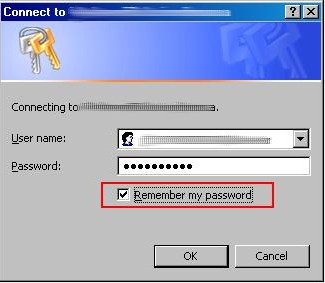
If the user is not in the same domain as the server where the cross-domain requests go to, e.g. a user logs into domainA and accesses a web page in which some JavaScript Ajax calls to http://companyB.com in domainB, then the single-sign-on won't work because domainA users can not be authenticated by domainB so a login window will pop up for user to input the username and password. In IE you have the option to save the password in this case:

After you select to save your password then next time IE will automatically authenticate for you (no need to input username and password again) on the same site if the "Automatic logon with current user name and password" is configured for the zone:

You can only save the password in IE but not in Chrome or Firefox. When the password is saved the Chrome will have the same behavior as IE, and you need to configure the same "network.automatic-ntlm-auth.trusted-uris" setting to let Firefox do the auto-authentication.

Where the password is saved by IE? They are stored in Windows secure storage. You can see and update those saved usernames and passwords by clicking "Control Panel => User Account => Advanced => Manage Password" or run "control keymgr.dll" command:

Just like the previous case you will also see a browser login window if the authentication failed.

3. Server is Form authentication.

In Form authentication you submit your username and password to the server. The server will issue an authentication cookie to the client if username and password are valid, then you are authenticated and logged on. The interactive steps are purely HTML and all browsers have the same behavior. After logging in the authentication cookie will be sent by browser in the consequent calls to the same server with same URI domain. The auto-authentication of AJAX calls will be okay if the cookie is valid which means that you have logged in to the server before the AJAX call. In some login forms you can select to "keep me logged in" option where a persistence cookie is generated for long time usage so you can auto-login next time even you close and reopen the browser.

Not like Windows authentication, browser will not popup a login window when authentication failed in AJAX calls, instead any error is silently swallowed by the browser by default. In Form authentication the server will respond to the client to redirect to the login page which is not recognized by AJAX call. Of course you can handle that specific 302 redirect case and popup a login window using JavaScript but that's another story.

4. How about OpenID, SAML, OAuth, Claimed based authentication, Federated authentication...?

In most cases the behavior is the same as Form authentication: access would be okay if you have signed in before the AJAX calls. This is valid as long as the server is using cookie to trace the authentication status, such as Windows and Form authentication discussed above, otherwise the authentication immediately fails. How to know if the server is using authentication cookie? You can check if you are able to access the site assets after successfully authenticated through the browser.

There're some cases where each service request requires authentication. The AJAX call will fail in such case unless you provide required data. One example is the new Twitter API V1.1: every Twitter API service call now requires OAuth authentication. Setting OAuth header using JavaScript directly is impractical and unsafe (however you could calculate the OAuth signature from the web server and JavaScript simply pass it to the Twitter service).

Also like Form authentication, you won't see any popup window whenever the authentication fails, and the AJAX calls are simply failed.

5. What about SSL, SSL client authentication?

SSL, also known as https protocol, encrypts the data in transport layer so the communication between the client and the server is protected. SSL itself doesn't do anything for Authentication. However server certificate is required to establish a SSL connection. The AJAX calls will fail if the server certificate is invalid such as a self-signed certificate. Browser will display a warning message if you visit the server with invalid certificate directly (not from AJAX call):

In order to get rid of the warning message, you could install the certificate and put it into Trusted Root Certification Authorities for IE and Chrome (caution of doing so) or import it to Firefox. After that you can visit the site without seeing the warning message page, and the AJAX calls now will be able to go through to the server for authentication.

SSL client authentication is another story. Basically SSL server also asks client's certificate when setting up the SSL connection. The SSL client authentication can be configured as optional or required. If client authentication is required the SSL connection will fail if browser doesn't provide a certificate, or the certificate is invalid, or the certificate is not accepted. If the SSL client authentication is okay, the SSL connection will be established and the regular server side authentication will come to play in the next step.

In summary, an indicator of a successful AJAX call is that you can browse the resource or service directly without any issue. The statement is okay for same-domain AJAX calls, but that's not enough in cross-domain scenarios where you can visit the site successfully in the browser but the cross-domain AJAX calls fail (such failure is not caused by client-server authentication). Cross-domain AJAX communication requires special implementation in both client side and server side, for example, you can define {crossDomain: true, dataType: 'jsonp'} parameters for jQuery AJAX calls in the client side, and implement JSONP or CORS in the server side. Following html page is created to test the cross-domain request using jQuery. Simply save the html page in your local machine, open the page and run the test:

<html xmlns="http://www.w3.org/1999/xhtml">
<head>
    <meta http-equiv="content-type" content="text/html; charset=utf-8" />          
    <title>Cross-domain AJAX test</title>          
    <script src="http://ajax.googleapis.com/ajax/libs/jquery/1.9.1/jquery.min.js" ></script>
</head>     
<body>         
    <div>
        <div style="text-align:center">
            <h3>Cross-domain AJAX test</h3>
            Server URL:  <input name="txtUrl" type="text" id="txtUrl" style="width:500px;" />
            <button id="btnTest">Send cross-domain request</button>
        </div>
        <div id="result"></div>
    </div>
    <script type="text/javascript">
        $(document).ready(function() {
            $("#btnTest").click(function () {
                testRequest($("#txtUrl").val());    
            });
        });
        
        function testRequest(url) {
            $("#result").html("");
            if (url) {
                $.ajax({url: url, cache: false, crossDomain: true, dataType: 'jsonp'})
                .done(function(data) {
                    var value = getDataString(data);//decodeURIComponent($.param(myObject));
                    $("#result").html("Response:<pre>" + value + "</pre>");})
                .fail(function(xhr, err) {
                    $("#result").html("Error occurs.");
                });    
            } else {
                $("#result").html("Invalid Url.");
            }
        }
        
        // http://www.sitepoint.com/javascript-json-serialization/
        function  getDataString(obj) { 
            var t = typeof (obj);
            if (t != "object" || obj === null) {
                // simple data type
                if (t == "string") 
                    obj = '"'+obj.replace(/>/g,'&gt;').replace(/</g,'&lt;')+'"';
                return String(obj);
            } else {
                // recurse array or object
                var n, v, json = [], arr = (obj && obj.constructor == Array);
                for (n in obj) {
                    v = obj[n]; t = typeof(v);
                    if (t == "string") 
                        v = '"'+v+'"';
                    else if (t == "object" && v !== null) 
                        v = getDataString(v);
                    json.push((arr ? "" : '"' + n + '":') + String(v));
                }
                return (arr ? "[" : "{") + String(json) + (arr ? "]" : "}");
            }
        };
    </script>
</body>
</html>

Thursday, June 06, 2013

Using FusionCharts in SharePoint

FusionCharts provide a separate product for SharePoint called Collabion Charts for SharePoint a SharePoint, where you can build charting pages easily in SharePoint by adding those charting WebParts. You have options to show FusionCharts in SharePoint if you have already purchased FusionCharts license and you don't want to pay extra for Collabion Charts. First you can use SharePoint as hosting environment, put all FusionCharts assets and the charting pages into a document library. Everything should just work fine. You can also add FusionCharts to a WebPart using out-of-box Content Editor WebPart (CEWP). First reference the FusionCharts JavaScript in one CEWP (edit HTML Source):
    <script src="/Documents/FusionCharts/FusionCharts.js" type="text/javascript"></script>
Then you can add chart in another CEWP:
    <div><div id="testChartContainer"></div></div>
    <script type="text/javascript">
    <!--  
        FusionCharts.setCurrentRenderer('javascript'); 
        var testChart = new FusionCharts( { id: "chart1", type: "Column2D", width: "400", height: "250"} );  
        testChart.setXMLUrl("/Documents/testChart.xml");      
        testChart.render("testChartContainer");
    // -->      
    </script>


Note: SharePoint 2010 could change the content you added to the CEWP via HTML Source editor. You need to make sure that the updated content and script are still valid.

Monday, June 03, 2013

A JavaScript Charting Solution - FusionCharts

Recently I have been working on FusionCharts to build dashboard pages. I think it's worthy writing some notes of my experience of using FusionCharts.

First of all, FusionCharts customer services are very good. I downloaded a trial version and did some testing. Then I have some issues and questions to ask. I always got their reply on the same day. FusionCharts is an India company. A few times I even received their replies in the afternoon which is midnight there (I am in UTC-5 zone). Overall they are helpful and respond quickly even although I am not their customer yet.

Secondly FusionCharts are purely client site implementation using Flash and JavaScript. All my discussion in this article is based on their JavaScript solution. That's different from some other data visualization tools I used before, such as Dundas, Infragistrics and DevExpress, all of which are .NET components, and they are considered as server side solution where you build your charts in ASP.NET code behind, and the charting images are generated in the server side.

The good part of client side approach is easy to develop and deploy. You simply create a HTML page, add desired FusionCharts objects, set their data source using JavaScript then you are done. The chart page can be put to anywhere that the user can access to such as in a web server, a shared drive or even local box, as long as the data source is also accessible to the user. In addition the client side JavaScript is considered as a cross-platform solution being able to run in different environment.

The drawbacks of client side approach include the potential performance issue, and the cross-domain data source restriction, as discussed below in detail.

Performance Issue

The charts are populated and rendered inside the browser. The performance could be an issue if you have many charts on a page. One simple dashboard test page with 10 charts consuming static content takes 3-5 seconds to render in latest Firefox and Chrome, and IE8/9 are even worst taking a least double time to render the page. Note that the tests are conducted locally so in reality the network round-trip would introduce some more delay. This may not be unacceptable in some cases. One suggestion from FusionCharts to improve the performance is wrap the charting JavaScript inside a setTimeout function and that would make the page a little bit more responsive during the page initial load:

    setTimeout(function () {
        var myChart= new FusionCharts( { id: "chart1", type: "Column2D", width: "400", height: "250"} );  
        myChart.setXMLUrl("chart1.xml");      
        myChart.render("chart1"); 
    }, 0);

Cross Domain Data Source Issue

FusionCharts support XML or JSON data source. The chart data can be embedded inside the page, static file or dynamically loaded from the server. There will be a cross-domain issue if the data source is not coming from the same domain as the original one hosting the page. For instance, if the chart page is from http://companyA.com, then all data from http://companyB.com will be rejected by the browser.

Recent version of Firefox and Chrome as well as IE10 support CORS standard to resolve the cross-domain issue. Basically the response from http://companyB.com includes some specific headers informing the browser to accept this cross-domain data. For above example the header "Access-Control-Allow-Origin: http://companyA.com" or "Access-Control-Allow-Origin: *" would work. Another generic solution for cross-domain requests is use JSONP. The client sends a request with a callback function name and the server wraps all the data as a parameter for that callback function.

Following code snippet demos how to implement CORS and JSONP in .NET:

using System;
using System.Collections.Generic;
using System.Linq;
using System.Web;
using System.Text;

namespace DataService
{
    /// <summary>
    /// Web handler to serve FusionCharts data using JSONP or CORS to resolve cross-domain issue 
    /// </summary>
    public class FusionChartService : IHttpHandler
    {

        public void ProcessRequest(HttpContext context)
        {
            string data = GetData(); // Populate chart data
            bool isJsonFormat = false; // Are data JSON format?
            
            context.Response.ContentEncoding = System.Text.Encoding.UTF8;
            context.Response.ContentType = "text/plain";

            if (string.IsNullOrEmpty(callback)) // Add CORS headers if NOT JSONP
            {
                context.Response.AppendHeader("Access-Control-Allow-Origin", "*");
                context.Response.AppendHeader("Access-Control-Allow-Headers", "Content-Type");
                string requestHeaders = context.Request.Headers["Access-Control-Request-Headers"];
                if (!String.IsNullOrEmpty(requestHeaders))
                    context.Response.AppendHeader("Access-Control-Allow-Headers", requestHeaders);
                context.Response.Write(data);
            }
            else // Wrap data inside the callback founction for JSONP
            {
                context.Response.Write(string.Format("{0}({1})", callback, isJsonFormat ? data : EscapeString(data)));
            }
        }

        private static string EscapeString(string s)
        {
            StringBuilder sb = new StringBuilder();
            sb.Append("\"");
            foreach (char c in s)
            {
                switch (c)
                {
                    case '\"':
                        sb.Append("\\\"");
                        break;
                    case '\\':
                        sb.Append("\\\\");
                        break;
                    case '\b':
                        sb.Append("\\b");
                        break;
                    case '\f':
                        sb.Append("\\f");
                        break;
                    case '\n':
                        sb.Append("\\n");
                        break;
                    case '\r':
                        sb.Append("\\r");
                        break;
                    case '\t':
                        sb.Append("\\t");
                        break;
                    default:
                        int i = (int)c;
                        if (i < 32 || i > 127)
                            sb.AppendFormat("\\u{0:X04}", i);
                        else
                            sb.Append(c);
                        break;
                }
            }
            sb.Append("\"");

            return sb.ToString();
        }

        public bool IsReusable
        {
            get
            {
                return false;
            }
        }
    }
}
An example of Ajax call consuming the JSONP service using jQuery (testing with version of 1.8.3):
    var params = { url: 'http://companyB.com/FusionChartService.ashx', cache: false, crossDomain: true, dataType: 'jsonp text'};
    $.ajax(params).done(function(data) {
        var myChart = new FusionCharts( { id: "chart1", type: "Column2D", width: "400", height: "250", debugMode : false } );  
        myChart.setXMLData(data);      
        myChart.render("chart1"); 
    }).fail(function(xhr, err) {
        console.log(err);
    }); 

Cross Domain Authentication Issue

Cross-domain authentication is the major challenge for client side JavaScript solution. Windows and Kerberos authentication simply don't work. There's not much you can do with JavaScript in terms of cross-domain authentication. You can either enable anonymous access or implement BASIC authentication in the server. In the latter case, the client needs to pass plain text username and password for each cross-domain Ajax call which is not safe and is not allowed in most organizations. One workaround is use proxy server to authenticate the service. But that's not a flexible solution as that's hard to implement and maintain, introducing extra layer of delay, and pushing back some logic to the server. So FusionCharts is not recommended if do have such cross-domain use case.

2013-06 Update: More on cross-domain authentication.