Sunday, July 22, 2012

Including Product Tags in nopCommerce Import/Export

Product tags are not included in Excel import/export by default in nopCommerce solution. Product tags are many-to-many relation to products. Following code illustrates how to import/export product tags in nopCommerce (added to Nop.Services.ExportImport in service layer):
using System;
using System.Collections.Generic;
using System.Linq;
using System.Text;
using Nop.Core.Domain.Catalog;
using Nop.Services.Catalog;
using OfficeOpenXml;

namespace Nop.Services.ExportImport
{
    /// <summary>
    /// Import/Export helper class
    /// </summary>
    public class ImportExportHelper
    {
        public static string[] AddCustomColumns(string[] properties)
        {
            string[] newProperties = new string[] 
            {       
                "ProductTags",      
            };
            string[] returnProperties = properties.Union(newProperties).ToArray();
            return returnProperties;
        }

        public static string GetProductTagsString(Product product)
        {
            var result = new StringBuilder();
            for (int i = 0; i < product.ProductTags.Count; i++)
            {
                var pt = product.ProductTags.ToList()[i];
                result.Append(pt.Name);
                if (i != product.ProductTags.Count - 1)
                    result.Append(", ");
            }
            return result.ToString();
        }

        public static string[] ParseProductTags(string productTags)
        {
            var result = new List<string>();
            if (!String.IsNullOrWhiteSpace(productTags))
            {
                string[] values = productTags.Split(new char[] { ',' }, StringSplitOptions.RemoveEmptyEntries);
                foreach (string val1 in values)
                    if (!String.IsNullOrEmpty(val1.Trim()))
                        result.Add(val1.Trim());
            }
            return result.ToArray();
        }

        public static void SaveProductTags(IProductService _productService, 
            IProductTagService _productTagService, Product product, string[] productTags)
        {
            if (product == null)
                throw new ArgumentNullException("product");

            //product tags
            var existingProductTags = product.ProductTags.OrderByDescending(pt => pt.ProductCount).ToList();
            var productTagsToDelete = new List<ProductTag>();
            foreach (var existingProductTag in existingProductTags)
            {
                bool found = false;
                foreach (string newProductTag in productTags)
                {
                    if (existingProductTag.Name.Equals(newProductTag, StringComparison.InvariantCultureIgnoreCase))
                    {
                        found = true;
                        break;
                    }
                }
                if (!found)
                {
                    productTagsToDelete.Add(existingProductTag);
                }
            }
            foreach (var productTag in productTagsToDelete)
            {
                product.ProductTags.Remove(productTag);
                //ensure product is saved before updating totals
                _productService.UpdateProduct(product);
                _productTagService.UpdateProductTagTotals(productTag);
            }
            foreach (string productTagName in productTags)
            {
                ProductTag productTag = null;
                var productTag2 = _productTagService.GetProductTagByName(productTagName);
                if (productTag2 == null)
                {
                    //add new product tag
                    productTag = new ProductTag()
                    {
                        Name = productTagName,
                        ProductCount = 0
                    };
                    _productTagService.InsertProductTag(productTag);
                }
                else
                {
                    productTag = productTag2;
                }
                if (!product.ProductTagExists(productTag.Id))
                {
                    product.ProductTags.Add(productTag);
                    //ensure product is saved before updating totals
                    _productService.UpdateProduct(product);
                }
                //update product tag totals 
                _productTagService.UpdateProductTagTotals(productTag);
            }
        }

    }

    /// <summary>
    /// Partial class of ExportManager
    /// </summary>
    public partial class ExportManager : IExportManager
    {
        public void UpdateCustomProductProperties(ExcelWorksheet worksheet, int row, ref int column, Product product)
        {
            string productTags = ImportExportHelper.GetProductTagsString(product);
            worksheet.Cells[row, column].Value = productTags;
            column++;
        }

    }

    /// <summary>
    /// Partial class of ImportManager
    /// </summary>
    public partial class ImportManager : IImportManager
    {
        public void UpdateCustomProductProperties(ExcelWorksheet worksheet, string[] properties, int row, Product product)
        {
            string productTags = Convert.ToString(worksheet.Cells[row, GetColumnIndex(properties, "ProductTags")].Value);
            ImportExportHelper.SaveProductTags(_productService, _productTagService, product, ImportExportHelper.ParseProductTags(productTags));
        }
    }
}
In order to use above code, the original ExportManager and ImportManager need to be modified a bit. Go to Nop.Services.ExportImport/ExportManger.cs, inside the ExportProductsToXlsx method:

1. Update property definition and add following code after line 532:
properties = ImportExportHelper.AddCustomColumns(properties);
2. Export product tags using custom function and add following code after line 797:
UpdateCustomProductProperties(worksheet, row, ref col, p);

Update Nop.Services.ExportImport/ExportManger.cs constructor and inject IProductTagService:
 public partial class ImportManager : IImportManager
    {
        private readonly IProductService _productService;
        private readonly ICategoryService _categoryService;
        private readonly IManufacturerService _manufacturerService;
        private readonly IPictureService _pictureService;
        private readonly IProductTagService _productTagService;

        public ImportManager(IProductService productService, ICategoryService categoryService,
            IManufacturerService manufacturerService, IPictureService pictureService, 
            IProductTagService productTagService)
        {
            this._productService = productService;
            this._categoryService = categoryService;
            this._manufacturerService = manufacturerService;
            this._pictureService = pictureService;
            this._productTagService = productTagService;
        }
Then update ImportProductsFromXlsx method inside ExportManger.cs:

1. Update property definition; add following code after line 142:
properties = ImportExportHelper.AddCustomColumns(properties);
2. Import product tags using custom function add following code after line 318 AND line 402:
UpdateCustomProductProperties(worksheet, properties, iRow, product);

Rebuild the solution and test out.

Create Custom Scheduled Task in nopCommerce

nopCommerce is a popular open source eCommerce solution built by ASP.NET MVC framework. We can create a custom scheduled task to scan the products periodically and do some business logic there, e.g. sending out email notification if some condition reached for certain products. In order to do that we need to define a record in the ScheduleTask table. Following script inserts a scheduled task record into database that would make nopCommerce invoke 'Nop.Services.Messages.ProductScanService' every 10 minutes:
INSERT INTO ScheduleTask(Name, Seconds, [Type], [Enabled], StopOnError)
 VALUES('ProductScanService schedule', 600, 'Nop.Services.Messages.ProductScanService', 1, 0) 
The ProductScanService class implements ITask interface, and is added to nop.Services.Messages in the service layer (tested in the latest version of 2.60):
using System;
using System.Collections.Generic;
using System.Linq;
using System.Text;
using Nop.Services.Tasks;
using Nop.Services.Catalog;
using Nop.Services.Logging;

namespace Nop.Services.Messages
{
    class ProductScanService : ITask
    {
        private readonly IProductService _productService;
        private readonly ILogger _logger;

        /// <summary>
        /// Dependency injection here
        /// </summary>
        public ProductScanService(IProductService productService, ILogger logger)
        {
            this._productService = productService;
            this._logger = logger;
        }

        /// <summary>
        /// Executes the task
        /// </summary>
        public void Execute()
        {
            _logger.Information(string.Format("ProductScanService starts at {0} (UTC {1})", 
                DateTime.Now, DateTime.UtcNow));
            ScanAllProducts();
            _logger.Information(string.Format("ProductScanService ends at {0} (UTC {1})",
                DateTime.Now, DateTime.UtcNow));
        }

        /// <summary>
        /// Do business logic here
        /// </summary>
        private void ScanAllProducts()
        {
            // Do stuff with _productService
        }
    }
}

Tuesday, May 29, 2012

Pitfall in Responding to Different Views With Windows 8 WinJS Solution

It's recommended to use CSS to update the layout using CSS media selector, for instance, following css defines two sizes for the column class, one for landscape and the other for portrait:
@media screen and {-ms-view-state: fullscreen-portrait} {
    .column { width: 400px;}
} 
@media screen and {-ms-view-state: fullscreen-portrait} {
    .column { width: 250px; }
}
But in some situations the page layout as well as content vary based on the view-state (this view-state refers to the screen view state for a win8 device, totally different concept from the ASP.NET view state), and CSS is not capable of handling that. In such case, we usually use DOM window's resize event for notification. Traditional way of doing that is assign the handler as below:
window.onresize = function () { // Do stuff based on current view-state};
The handler still works in WinJS but it would override other handlers. A better way is to use addEventListener:
window.addEventListener("resize", pageLayoutChanged); 
function pageLayoutChanged() {
    // Do stuff based on current view-state
}
With addEventListener you can define multiple handler functions and they will all be invoked when event is triggered (sequence not determined). Be aware that this window object is global. So all registered event handlers will be invoked when you navigate to different pages. For example, you have page1LayoutChanged event in page1 and page2LayoutChanged event in page2. When the screen's view-state is changed, both page1LayoutChanged and page2LayoutChanged function will be triggered to run no matter when accessing page1 or page2.

This behavior is totally fine in Web application where new DOM objects and Javascript references are constructed when a page is loaded from server and rendered inside the browser. That's not the case for a WinJS app since all Javascript closures are still effective when running inside WinJS context. This may cause problem sometimes. Let's look at an example here. References to page1 local objects inside page1LayoutChanged function will be null when you are on page2. So we need to have some logic to check if it's current page inside the event handler function in this case. An easy way is check if a page DOM element exists or not:
// page1 view-state change event handler
function pageLayoutChanged() {
    var pageElement = document.getElementById("page1Header");
    if (pageElement) { 
        // Do stuff based on current view-state
    }
}
If you happen to use WinJS Navigation App template in which a pre-defined resize handler inside navigator.js will check and call a "updateLayout" page function, so you could just your add view-state change logic inside the updateLayout function without registering resize event handler:
updateLayout: function (element, viewState, lastViewState) {
    var pageElement = document.getElementById("page1Header");
    if (pageElement) { 
        // Do stuff based on current view-state
    }
}
Another note is that we use document.getElementById function to get a DOM element from the page. Actually there's a short-cut for element selector in WinJS app: simply reference any DOM element in Javascript by its unique ID. So following Javascript is equivalent to above version:
updateLayout: function (element, viewState, lastViewState) {
    if (page1Header) { 
        // Do stuff based on current view-state
    }
}

Saturday, May 26, 2012

More On WinJS Promise

I did some research on WinJS Promise in my previous post. Here are some more findings:

What's the difference between Promise then and done functions?

WinJS Promise then and done both take three optional functions (onComplete, onError, onProgress) as parameters. Promise then function returns another Promise object so you can chain the Promise one by one like fnAsync().then().then()... On the other hand Promise done function doesn't return any value so it should be used at the end of the flow.

The Promise error will be thrown as an unhandled exception if there's no error handler is defined in the Promise chain even the Promise execution of that error is wrapped inside a try catch block. The difference is that the Promise then function will swallow the error and keep going forward to the next chained Promise until the error handler is found, but Promise done function would throw the error immediately. Note that the regular JavaScript exceptions (not the Promise error) remain the same behavior inside both then/done functions, and they can be handled by try catch block.

What to return from a Promise then function?

Promise then function returns a Promise. If the callback function has a return value (not a Promise), WinJS will create a Promise to return and the callback function’s return value will be passed to the next callback back function. Method addThenDouble1 and addThenDouble2 have the same result in following code snippet:
    function addAsync(number1, number2) {
        return new WinJS.Promise(function (c, m, p) {
            setTimeout(function () {
                c(number1 + number2);
            }, 1000); // Caculate after one second
        });
    }

    function addThenDouble1(number1, number2) {
        return addAsync(number1, number2).then(function (data) {
            return data * 2;
        });
    }

    function addThenDouble2(number1, number2) {
        return addAsync(number1, number2).then(function (data) {
            return new WinJS.Promise(function (c, m, p) {
                c(data * 2);
            });
        });
    }

    function test() {
        addThenDouble1(2, 3).then(function (data) {
            var value = data; // value = 10;
        });

        addThenDouble2(2, 3).then(function (data) {
            var value = data; // value = 10;
        });

        addAsync(2, 3).then(function (data) {
            return new WinJS.Promise(function (c, m, p) {
                c(data * 2);
                return 100; // this line of code has no effect
            });
        }).then(function (data) {
            var value = data; // value = 10;
        });

        addAsync(2, 3).then(function (data) { return data * 2; }).then(function (data) {
            var value = data; // value = 10;
        });
    }
We can see such logic in one of its overloading methods defined in base.js from WinJS library:
    then: function CompletePromise_then(onComplete) {
        try {
            // If the value returned from the completion handler is the same as the value
            // provided to the completion handler then there is no need for a new promise.
            var newValue = onComplete ? onComplete(this._value) : this._value;
            return newValue === this._value ? this : new CompletePromise(newValue);
        } catch (ex) {
            return new ExceptionPromise(ex);
        }
    }
The parameter sent to the next Promise.then function will be undefined if the function doesn't return anything inside the previous then function. You can create a Promise object and send as many parameters as you want as below demo:
     fnAsync().then(function (data) {
            return new WinJS.Promise(function (c, m, p) {
                // logic to get p1, p2, p3
                c(p1, p2, p3);
            });
        }).then(function (p1, p2, p3) {
            // do stuff
        });
Would it be possible to make a Promise from async to sync or block/wait a Promise to complete?

Promise function will return immediately and it relies on callback function to do the next task. Is it possible to block the Promise object until it's complete so we can get back to the classic procedural flow like following code snippet?
    function fnAsync() {
        return new WinJS.Promise(function (c, m, p) { ... });
    }
    function fnSync() {
        var promise = fnAsync();
        // Wait until promise to complete
        var syncReturn = ?promise.getReturnValueSomehow()?
        return syncReturn;
    }
The answer is no. You may think about the Promise.join function to help, but that join function is also returning a Promise. JavaScript is a single-threaded language by design, and there's no equivalent Sleep() function which can be used to check the object state periodically. So we have to use Promise's then or done function to complete the tasks flow.

Wednesday, May 23, 2012

SharePoint Issues Caused by Inconsistent Times

Today we got some problems in our SharePoint environment after a few Windows patches installed by operation team:

1.Missing Search Bar on main page.
2.No search results when Find an Associate is used.
3.User Audiences not working (all web parts appearing on main page).
4.Missing Navigation/Links Bar on left.

It looks like something wrong with the application service at the first glance. By looking at the SharePoint log, one specific error caught my attention:

...Exception occured while connecting to WCF endpoint: System.ServiceModel.Security.MessageSecurityException: The security timestamp is invalid because its creation time ('2012-05-23T13:53:00.168Z') is in the future...

It tells there were some time-related issue in the farm. When the system admin logged in to front-end and application servers, he found there's 10 minutes difference between two servers! After syncing the time all SharePoint issues were gone and the portal was back to normal immediately.

So the root cause was the time inconsistency in the SharePoint farm, nothing related to the Windows patches. When the front-end server got a reply from the application server, it noticed response timestamp was far ahead of its local time, and then it throw a security exception and terminated further processing.

Why that time variance happened? One major reason is that our two SharePoint front-end servers are actually virtual machines, while the application server is a physical machine. The virtual machines would lose some time when hibernate or reboot if time service is not set properly.

Friday, May 04, 2012

A Study of WinJS Promise

.NET 4.5 introduces a new async/await asynchronous programming pattern. Metro Javascript library WinJS also has a similar asynchronous programming paradigm called Promise. Promise is an Javascript object with a "then" function that takes three parameters: a complete callback function, an optional failure callback function, and an optional on progress callback function. We can do something like:
    function getWebContentPromise(url) {
        WinJS.xhr({ url: url }).then(
            function (result) { // Successfully
                console.log("Get web content successfully. Data length:" + result.responseText.length);
            },
            function (err) { // Failed
                console.log("Get web content failed. Error:" + err);
            },
            function (prog) { // On progress
                console.log("Get web content on progress...");
            });
    }
I tested above script in Visual Studio 11 Beta. WinJS.xhr({ url: url }) returns immediately, and those "then" callback functions are hit later when the response content is ready or error occurs due to network issue. Looks good so far. How can I create my own Promise and asynchronous function? Say I have a simple script as follow:
    function complicatedCalculation(x, y) {
        var result = x + y;
        // fake busy work...
        for (var i = 1; i < 10000000; i++) {
            var dummy = (i * i) / i;
        }
        return result;
    }

    function getResult(x, y) {
        var result = complicatedCalculation(x, y);
        return result;
    }
It's just a heavy function that would block the UI for a while. So how can we convert it to be Promise-able? From MSDN documentation, I found Promise.as and Promise.wrap functions, and both could wrap an object in a Promise object. Unfortunately the documentation is super simple without any sample code or detail explanation, basically just useless. Forgive that since WinJS is still in Beta. Anyway I tried:
    WinJS.Promise.wrap(complicatedCalculation(x, y)).then(...
It works but it's not asynchronous, i.e. WinJS.Promise.wrap(complicatedCalculation(x, y)) doesn't return immediately, instead "then" callback functions are invoked only after the complicatedCalculation function is completed. That's not what we want. So I manually convert above method to the Promise object, whose constructor accepts three parameter, a complete callback function, an optional error callback function, and an optional on-progress callback function:
    function complicatedCalculationPromise(x, y) {
        return new WinJS.Promise(function (completeCallback, errorCallback, progressCallback) {
            try {
                var result = x + y;
                // fake some busy work here...
                for (var i = 1; i < 10000000; i++) {
                    var dummy = parseInt((i * i) / i);
                    if (progressCallback && dummy % 1000000 == 0)
                        progressCallback(dummy);
                }
                completeCallback(result);
            } catch (e) {
                errorCallback(e);
            }
        });
    }

    function getResult(x, y) {
        complicatedCalculationPromise(x, y).then(function (result) {
            return result;
        });
    }
Above code compiles okay and works without any exception. But it's still a synchronous function. The fuction complicatedCalculationPromise blocks the operation until the calculation is completed. I guess it's due to the fact that Javascript is single-threaded. Why WinJS.xhr could be asynchonous? The reason is that inside the xhr function, an XMLHttpRequest is created, a callback for response change event is registered, the request is sent out and then xhr method will return immediately without waiting the response from network. XMLHttpRequest supports asynchronous callback natively. WinJS.xhr is simply a wrapper of XMLHttpRequest and exposes it as a Promise object.

To simulate an asynchronous processing in Javascript, we could modify the script as below:
    function complicatedCalculationAsync(x, y) {
        return new WinJS.Promise(function (completeCallback, errorCallback, progressCallback) {
            var count = 0;
            var result = x + y;
            try {
                setTimeout(function () {
                    count++;
                    if (count == 10000)
                        completeCallback(result);

                    var dummy = parseInt((count * count) / count);
                    if (progressCallback && dummy % 1000 == 0)
                        progressCallback(dummy);

                    setTimeout(arguments.callee, 0);
                }, 0);
            } catch (e) {
                errorCallback(e);
            }
        });
    }
Now the function becomes real asynchronous. But we have to partition the work manually and use setTimeout timer function to hand back control to Javascript execution thread periodically. All those hustles are due to the limitation of single-threaded Javascript model for UI processing. In HTML5 Web Workers allows you to load the Javascript dynamically and run it in background thread, and you can pass result back to the UI thread. I hope that when WinJS.Promise is final released, it could have an option to integrate with Web Workers so asynchronous execution can be run in a separate background thread. That would be a big lift in my opinion.

Thursday, April 19, 2012

Windows RT Deployment Error

I created a Windows RT (Windows 8) Metro app, packaged it and tested in dev environment without any problem. However I got below error when installing the package in another machine (a Samsung tablet):

Add-AppxPackage : Deployment failed with HRESULT: 0x80073CFF, To install this application you need either a Windows developer license or a sideloading-enabled system Deployment of package 02897621-4EBE-4E92-9B00-263BAA300DAC_1.0.0.2_x64__32kjnh8rzfyae [Package Full Name] failed because no valid license or sideloading policy could be applied. A developer license (http://go.microsoft.com/fwlink/?LinkId=233074) or enterprise sideloading configuration (http://go.microsoft.com/fwlink/?LinkId=231020) may be required. NOTE: For additional information, look for [ActivityId] 692ada4a-1bf0-0003-86dc-2a69f01bcd01 in the Event Log or use the command line Get-AppxLog -ActivityID 692ada4a-1bf0-0003-86dc-2a69f01bcd01
At line:1 char:236
+ ... $PackageFile; Add-AppxPackage $PackageFile; if(!$?) {exit 8}
+ ~~~~~~~~~~~~~~~~~~~~~~~~~~~~
+ CategoryInfo : NotSpecified: (C:\Users\in..._x64_Debug.appx  :String) [Add-AppxPackage], Exception
+ FullyQualifiedErrorId : DeploymentError,Microsoft. Windows.Appx.PackageManager.Commands. AddAppxPackageCommand
ERROR: FAILED TO INSTALL DEVELOPER PACKAGE!

It turned out that a developer license is required in the tablet although it's not a development machine. One thing interesting is that I built another Windows 8 XAML application based on a solution came with Microsoft Metro app samples, and that application was installed and run successfully in the tablet. It looks like Windows RT has a certificate check process, and developer license is not required if the app's certificate belongs to Microsoft.

Monday, April 16, 2012

Windows 8 Metro PopupMenu Issue

How to create a popup in Windows 8 Metro apps? MessageDialog and PopupMenu seem to be the only two options if you go with XAML/C# approach (at least for current Customer Preview edition). MessageDialog is just the Metro implementation of WinForm MessageBox. PopupMenu represents a context menu for quick commands/actions.

Today I created a Metro application and used PopupMenu to populate a list of hints for user's input. But it's just not showing anything. I digged into the issue and found a big limitation of PopupMenu: the maximum number of popup items (UIComment or UICommandSeparator) is only 6! For example following code would throw a "The operation attempted to access data outside the valid range" exception:
            var popupMenu = new PopupMenu();
            popupMenu.Commands.Add(new UICommand("Hints", null, string.Empty));
            popupMenu.Commands.Add(new UICommandSeparator());
            popupMenu.Commands.Add(new UICommand("Hint 1", null, "Hint 1"));
            popupMenu.Commands.Add(new UICommand("Hint 2", null, "Hint 2"));
            popupMenu.Commands.Add(new UICommand("Hint 3", null, "Hint 3"));
            popupMenu.Commands.Add(new UICommand("Hint 4", null, "Hint 4"));
            popupMenu.Commands.Add(new UICommand("Hint 5", null, "Hint 5")); // <== Throw exception here
I am not sure if it's bug or limitation. There may be some reason behind that but I couldn't find any information about this limit in any MSDN documentation. Another limitation of PopupMenu is that you can't customize the look and feel of it. You may end up implementing your own popup control since the out-of-box popup function is so limited.
2012-8-28 update: the same issue still exists in the latest Windows 8 RTM version. Let's just say this is by design and is an undocumented limitation.

Thursday, April 05, 2012

ThrowIfMaxHttpCollectionKeysExceeded Error When Populating WebPart

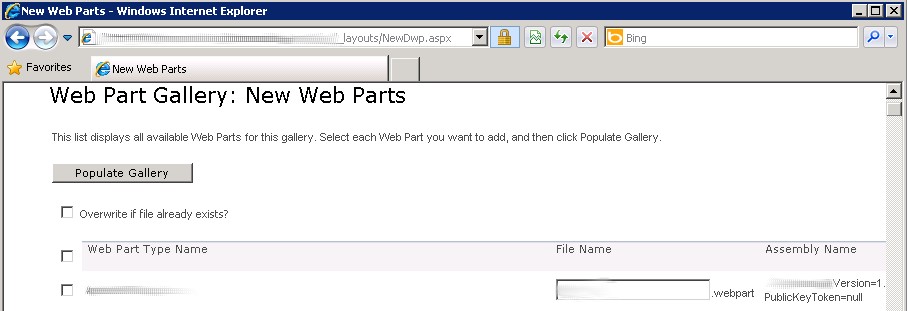
A custom WebPart won't show in the available WebPart list when it's deployed to WebPart Gallery by a Feature. In order to use such WebPart, we need to manually populate it inside SharePoint WebPart Gallery. What you do is go to site collection's WebPart gallery, click "New" button on the toolbar, select the WebPart and click "Populate Gallery" button:


It used to be working fine but all in a sudden I got an error when populating a WebPart:


This runtime error doesn't provide any hints. There're two options to see the error detail.

1. Go to SharePoint ULS logs in SharePoint_12_Or_14_Hive\LOGS and do the search.
2. Set <customErrors mode="Off" /> in SharePoint_12_Or_14_Hive\TEMPLATE\LAYOUTS\Web.config (not the WebApplication itself).

The error found in the ULS log is:

w3wp.exe (0x21BC) 0x1EB0 SharePoint Foundation Runtime tkau Unexpected System.InvalidOperationException: Operation is not valid due to the current state of the object. at System.Web.HttpValueCollection.ThrowIfMaxHttpCollectionKeysExceeded() at System.Web.HttpValueCollection.FillFromEncodedBytes(Byte[] bytes, Encoding encoding) at System.Web.HttpRequest.FillInFormCollection() d5fef840-8ad4-46a3-ab11-0b37346e7a9f

It turns out the submit form has too many post values. Adding following appSetting to the WebApplication's web.config (C:\inetpub\wwwroot\wss\VirtualDirectories\{WebApplication}\Web.config) resolves the problem:
 <appSettings>
     <add key="aspnet:MaxHttpCollectionKeys" value="2000" />
 </appSettings>
As the key name suggested it's an ASP.NET related setting. Why the error happens in SharePoint suddenly? We have installed some Microsoft and SharePoint security patches recently. The default maximum 500 post values policy was introduced by those patches, specifically from Critical MS11-100 patches.

Wednesday, March 21, 2012

Task-based Asynchronous Programming in .NET 4.5

.NET 4.5 introduces the new "async" and "await" keywords to simplify the asynchronous programming. They are task-based asynchronous model, and are extensively used in the new Metro applications for better responsive UI experience. Following code example illustrate the simple usage of "async" and "await" (run in Visual Studio 11 Beta):
using System;
using System.Collections.Generic;
using System.Linq;
using System.Text;
using System.Threading.Tasks;
using System.Net;
using System.Net.Http;
using System.IO;
using System.Diagnostics;

namespace ConsoleApplication1
{
    class Program
    {
        static void Main(string[] args)
        {
            StringBuilder syncContent = new StringBuilder(), asyncContent = new StringBuilder();
            Stopwatch watch = new Stopwatch();
            string testUrl = "http://www.google.com";
            GetWebContent(testUrl); // Warming up network connection

            Console.WriteLine("Sync web request calls start...");
            watch.Start();
            for (int i = 0; i < 100; i++)
            {
                syncContent.Append(GetWebContent(testUrl));
            }
            watch.Stop();
            Console.WriteLine("Sync web calls completed within {0} ms", watch.ElapsedMilliseconds);
            Console.WriteLine("Sync web content lengh: {0}", syncContent.ToString().Length);

            List<Task<string>> tasks = new List<Task<string>>();
            Console.WriteLine("\nSync web request calls start...");
            watch.Restart();
            for (int i = 0; i < 100; i++)
            {
                tasks.Add(GetWebContentAsync(testUrl));
            }
            watch.Stop();

            Console.WriteLine("Async web calls returned within {0} ms", watch.ElapsedMilliseconds);
            watch.Restart();
            Task.WaitAll(tasks.ToArray());
            watch.Stop();
            tasks.ForEach(v => asyncContent.Append(v.Result));
            Console.WriteLine("ASync web calls completed within {0} ms", watch.ElapsedMilliseconds);
            Console.WriteLine("Async web content lengh: {0}", asyncContent.Length);

            Console.Read();
        }

        static async Task<string> GetWebContentAsync(string url)
        {
            var webClient = new WebClient();
            var content = await webClient.DownloadStringTaskAsync(url);
            return content;
        }

        static string GetWebContent(string url)
        {
            var webClient = new WebClient();
            var content = webClient.DownloadString(url);
            return content;
        }
    }
}
The synchronous method is included in the demo cod for comparison purpose. The console app result:


Basically you need to add "async" keyword to the function definition telling compiler they could be asynchronous call(s) inside that method; "async" methods can return Task (no actual return value), Task<T> (return value of T) or void (only used in event handler without any return).

Inside a method marked as "async", you are able to use "await" keyword for a call that promises return or return value. Once "await" keyword is used, compiler will do some magic stuff for you and make that asynchronous invocation happen. Many IO and network related methods in .NET 4.5 have been refactored to support this task-based asynchronous model. Those asynchronous methods, with naming convention of xxxxAsync where xxxx is the method name, are out-of-box and can be used directly with "await" keyword.

This async programming model is much easier to work with comparing to the old .NET asynchronous programming model. In old days, developers need to spend a lot of effort to handle those callback functions such as Beginxxxx/Endxxxx methods and IAsyncResult parameter. That's painful and sometimes it's impossible to do nested async calls and error handling. With the new task-based async model, all those hustles are gone.

You can easily wrap a method as async method using TPL introduced in .NET 4.0. Code snippet below shows one way to achieve this:
        static async Task<double> MyComplicatedHeavyCalculationAsync(double x, double y)
        {
            double value = await Task<double>.Run(() => MyComplicatedHeavyCalculation(x, y));
            return value;
        }

        static double MyComplicatedHeavyCalculation(double x, double y)
        {
            // Do your complicated work ...
            return x + y;
        }
All sound good. But how about the thread context such as updating the UI content? In WPF, Silverlight and Metro apps you are most likely safe to do so since compiler are smart enough to inject the delegate code that could marshall the update back to the UI thread. For ASP.NET things are a bit more tricky. You have thread pool and httpcontext for each request is dynamically generated. Good news is that the new ASP.NET 4.5 will support task-based asynchronous model in certain ways, refer next version ASP.NET white paper for detail.